
Update 4.0.5
🚀 Update 4.0.5 – Release Notes
We’re excited to announce Update 4.0.5 of the Ontraccr web and mobile apps!
This release introduces major improvements to form layout flexibility and checklist efficiency, along with important workflow, permissions, integration, and traceability enhancements across Projects, Boards, Materials, and User management.
Below is the complete list of enhancements, improvements, and fixes.
🧭 New Features & Enhancements — Web App
Half-Width Fields (Phase 1)
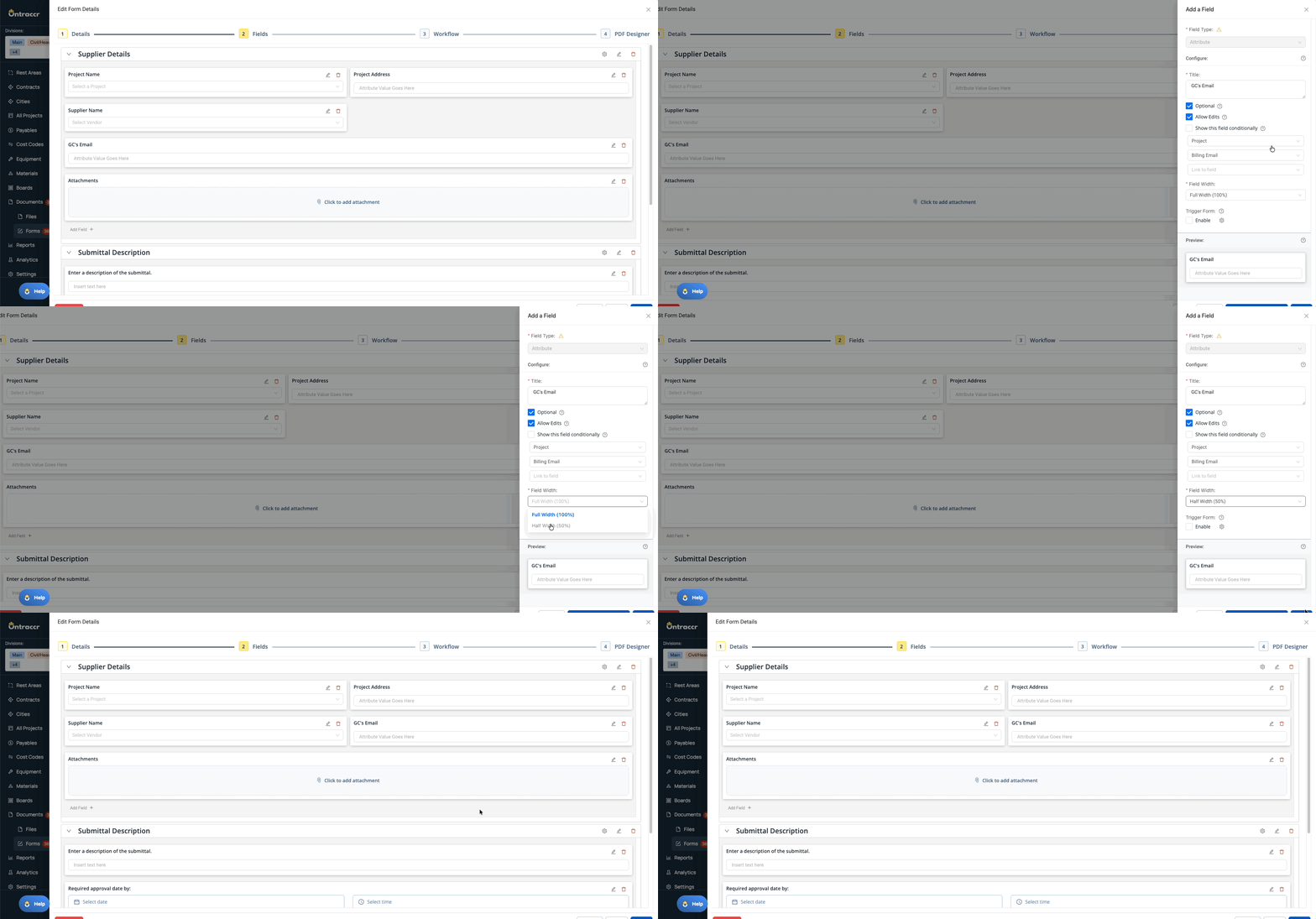
Form builders can now configure supported fields to display at half width on web, allowing fields to sit side-by-side for cleaner, more compact layouts. This significantly improves form readability and reduces scrolling for data-heavy workflows. This enhancement applies wherever these fields are used — including Forms, Boards, and other areas of the web app
This is the first phase of half-width support, with additional field types coming in a future release.
What’s New
- New Field Width selector in field configuration:
- Full Width
- Half Width
- Half-width fields can be positioned side-by-side
- Supported when:
- Filling out forms on web
- Viewing completed forms on web
- Drag-and-drop reordering fully supported
Supported Field Types (Phase 1)
Yes/No, Dropdown, Text, Calculation, Date Range, Date Time, Attribute, Payment, Static Text
A simple toggle unlocks a smarter layout — here’s how half-width fields help you build cleaner, more efficient forms in seconds.
Section-Level “Check All” for Yes/No Fields
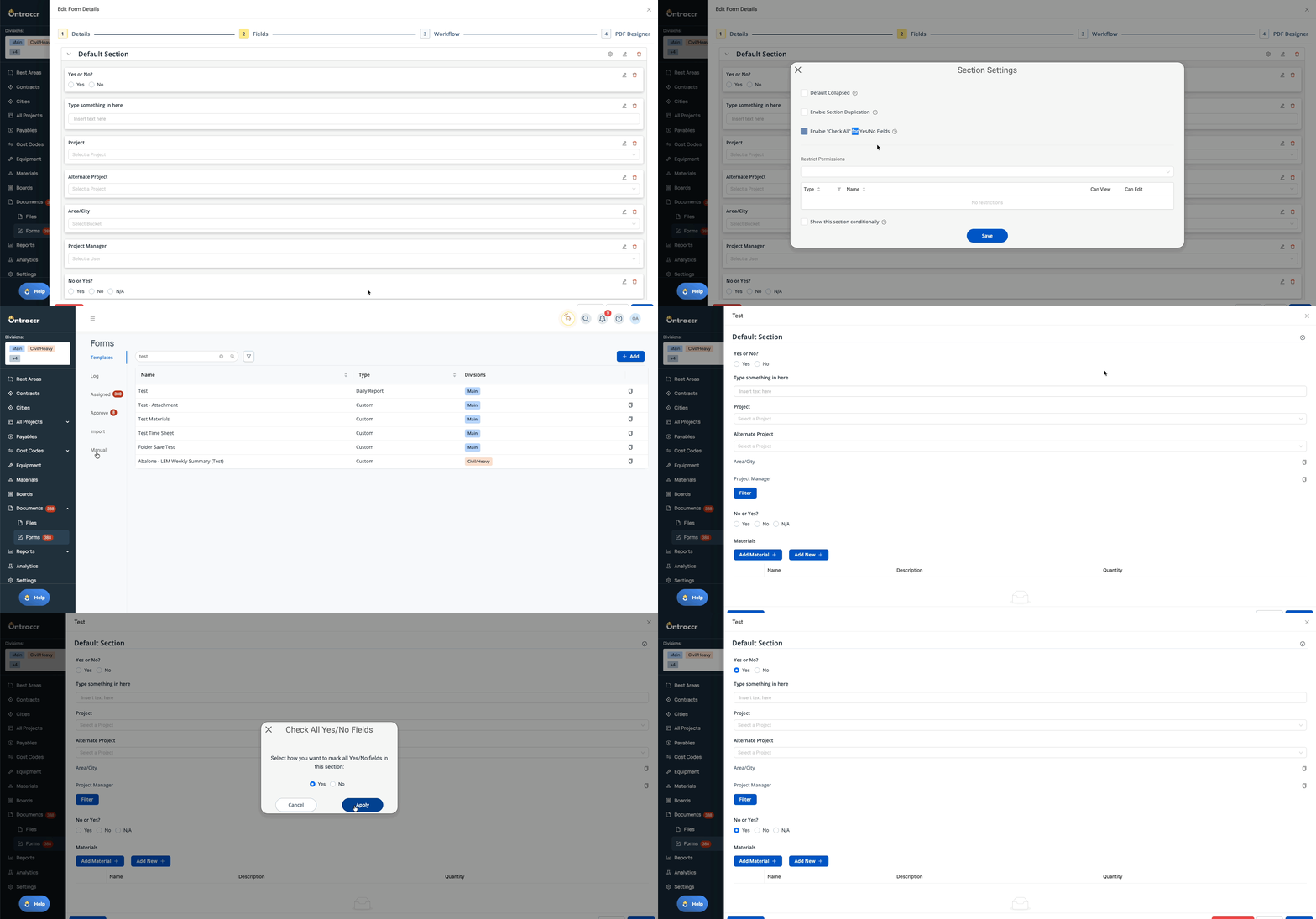
Large inspection and checklist forms just got faster. You can now enable a per-section “Check All” option for Yes/No fields, allowing users to quickly apply the same answer across an entire section.
What’s New
- New section-level setting:
- Enable “Check All” for Yes/No Fields
- When enabled, a Check Circle icon appears on that section during form completion
- Users can choose to apply:
- Yes to all visible Yes/No fields
- No to all visible Yes/No fields
- Only affects Yes/No fields within the selected section
- Hidden fields are not affected
- Users can still manually adjust any individual field afterward
One click. Every item answered. Large checklists just got dramatically faster.
⚙️ Web App Improvements & Fixes
- Division “Choose One or More” Field + Create User Division Mapping: Added a new Division multi-select field type for forms and enhanced the Create User workflow step to support mapping division access directly from the form. Users can now be assigned to one or multiple divisions during creation. If no division is mapped, the workflow defaults to the form’s division.
- Board List View – Expand All / Collapse All: Added a new Expand All / Collapse All toggle in board list view, allowing users to quickly expand or minimize all statuses at once from the board header.
- Dynamic Attribute Fields – “Link to Field” Option: Dynamic attribute fields now include a “Link to Field” configuration option, allowing builders to explicitly define which project field the dynamic attribute should reference when multiple project fields exist in a form.
- Eclipse Integration – Configurable Material Exclusion: Added a new Material Ignore Prefix setting in the Eclipse integration. Materials whose Description 1 begins with the configured prefix (e.g., “DNU”) will not sync into Ontraccr. If an existing material later receives the prefix, it will be archived on the next sync. If the prefix is removed in Eclipse, the material becomes active again on the next sync.
- Materials Timeline – Link to Consuming Form: Timeline entries created by form-based material consumption are now clickable, linking directly to the originating form so users can quickly trace why inventory quantities changed.
- Shared Board Shortlists – View & Edit Permissions: Shortlists now support configurable sharing permissions. When sharing a shortlist, owners can grant either View-only or Edit access. New users default to View-only, and permissions can be adjusted at any time.
- Projects Page – Configurable Bucket Columns: The Projects page now supports optional Bucket columns that can be enabled via the Columns (gear) selector. Companies can choose which bucket type to display, and the column will show the corresponding bucket value for each project. Bucket columns are disabled by default.
- Shift Table – Global Cost Code Submission Error: Fixed an issue where selecting a global cost code within a Shift Table could trigger a submission error and display an invalid value when editing the shift.
📱 New Features & Enhancements — Mobile App
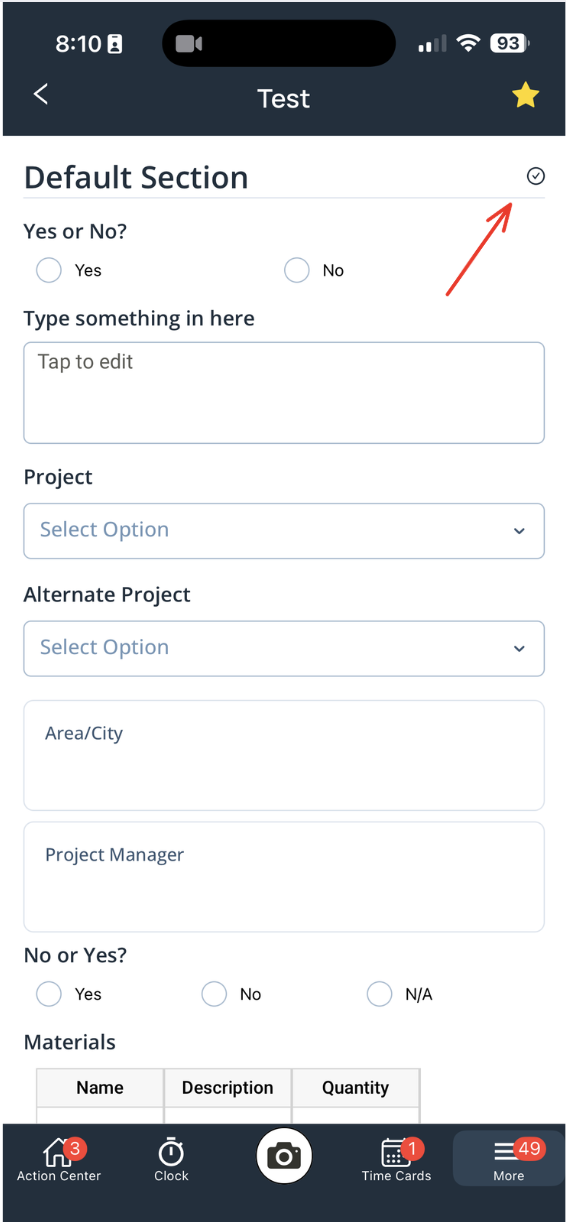
Section-Level “Check All” for Yes/No Fields: The new per-section Check All capability for Yes/No fields is supported on mobile during form completion, matching web behavior and applying only to visible Yes/No fields within the selected section.
Reduce friction in the field by instantly applying Yes or No across an entire section.
⚙️ Mobile App Improvements & Fixes
- Division “Choose One or More” Field Support: Mobile now fully supports the new Division multi-select field behavior across forms, filtering, and user-creation workflows, ensuring consistency with web-based division mapping.
✅ Update 4.0.5 Summary
Update 4.0.5 delivers powerful improvements to form flexibility and checklist efficiency, led by half-width field layouts and section-level “Check All” functionality. Together, these upgrades make large forms faster to complete and easier to design.
This release also strengthens division-based user automation, board usability, shortlist permissions, material traceability, and integration controls—making Ontraccr more configurable, more efficient, and more aligned with real-world operational workflows across web and mobile.