
Update 4.0.4
🚀 Update 4.0.4 – Release Notes
We’re excited to announce Update 4.0.4 of the Ontraccr web and mobile apps!
This release introduces major upgrades across Boards, Projects, Forms, Cost Codes, PDF Design, Search, and Mobile workflows, alongside a large set of performance, usability, and automation improvements.
Below is the complete list of enhancements, improvements, and fixes.
🧭 New Features & Enhancements — Web App
Project Page Filter Profiles with Favourites
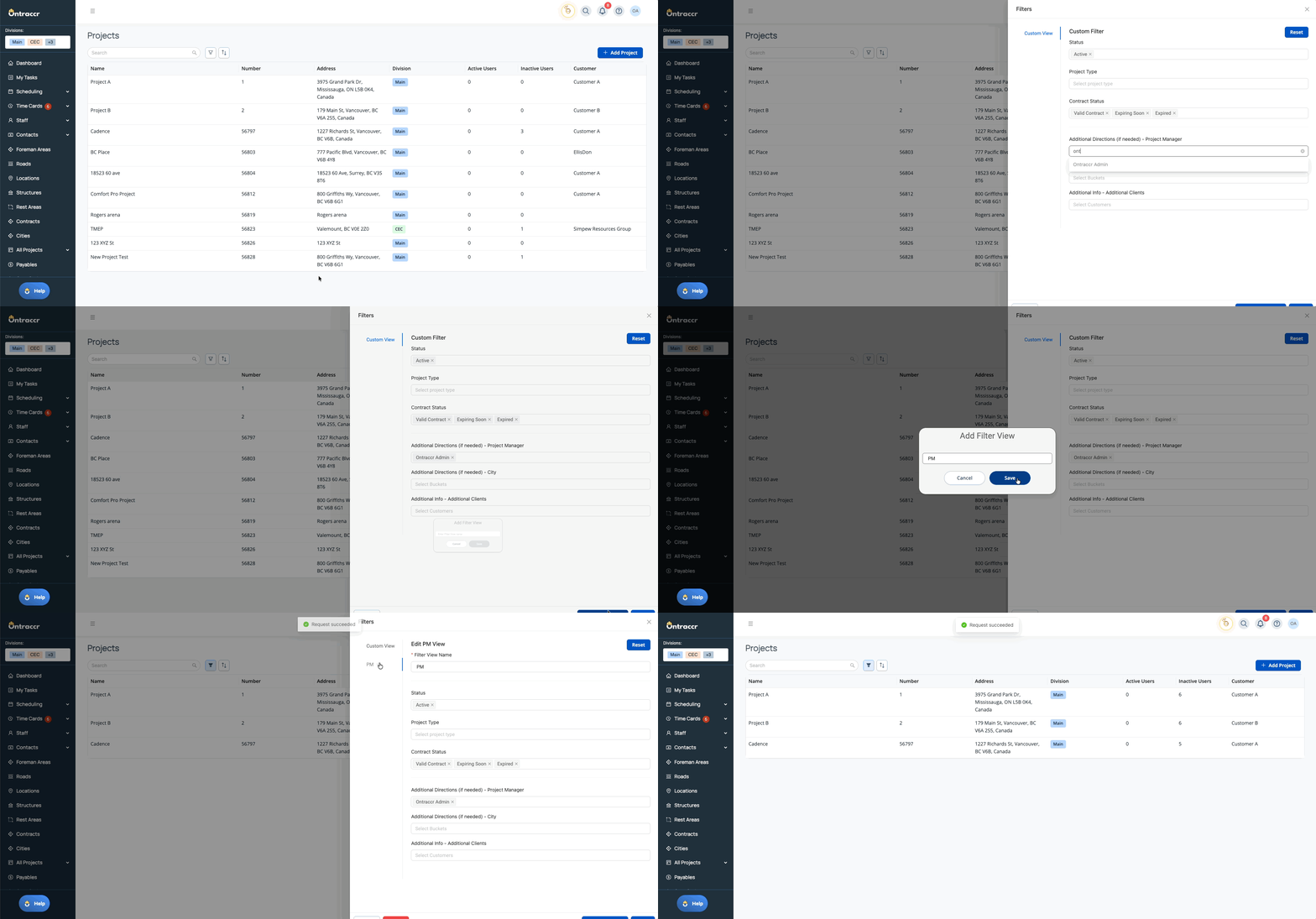
Project pages now support saved filter profiles — with the ability to favourite one so it automatically applies whenever you open the page.
This allows users to default their Projects view to only the projects relevant to their assigned area or responsibilities.
What’s New
- Create saved filter profiles on:
- Main Projects page
- Project Type–specific pages
- Favourite one filter profile per page to auto-load it by default
- If no favourite exists, the page loads unfiltered (current behavior)
A quick look at saving and favouriting filter profiles.
Cost Codes tab redesign in Project Profiles
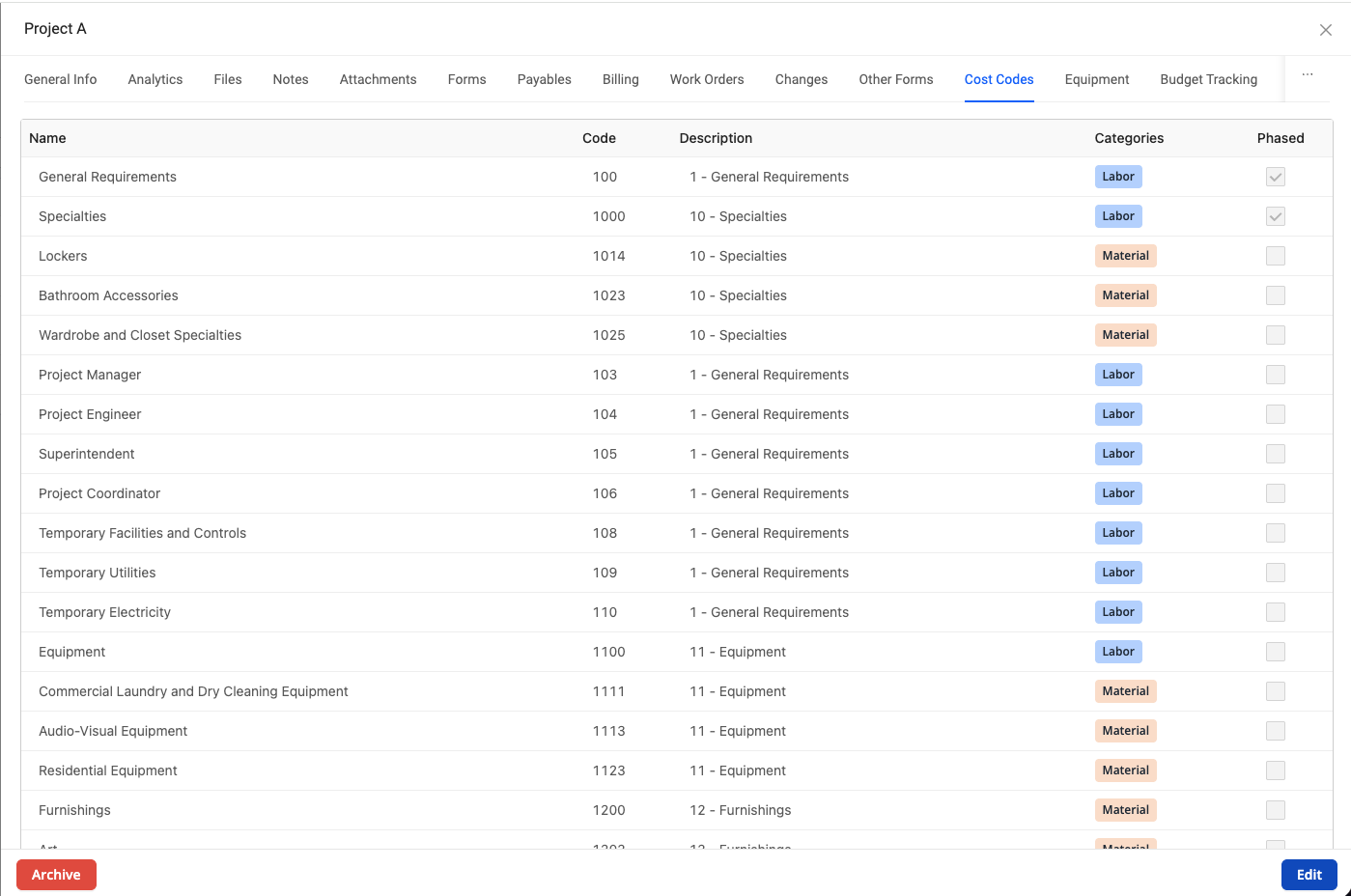
The Cost Codes tab inside Project Profiles has been redesigned to support the new multi-category cost code architecture.
What’s New
- New single list-view layout (no category-based sections)
- Cost codes displayed in one list, sorted by code
- New Categories column showing category tags per cost code
- Supports:
- Global cost codes
- Project-specific cost codes
- Multi-category cost codes
- Phased cost codes
Existing single-category cost codes are automatically migrated and appear with their corresponding category label.
A look at the redesigned Cost Codes tab
Otto PDF Agent – Upload a Template as a Design Reference
Otto’s first PDF Designer Agent enhancement is here.
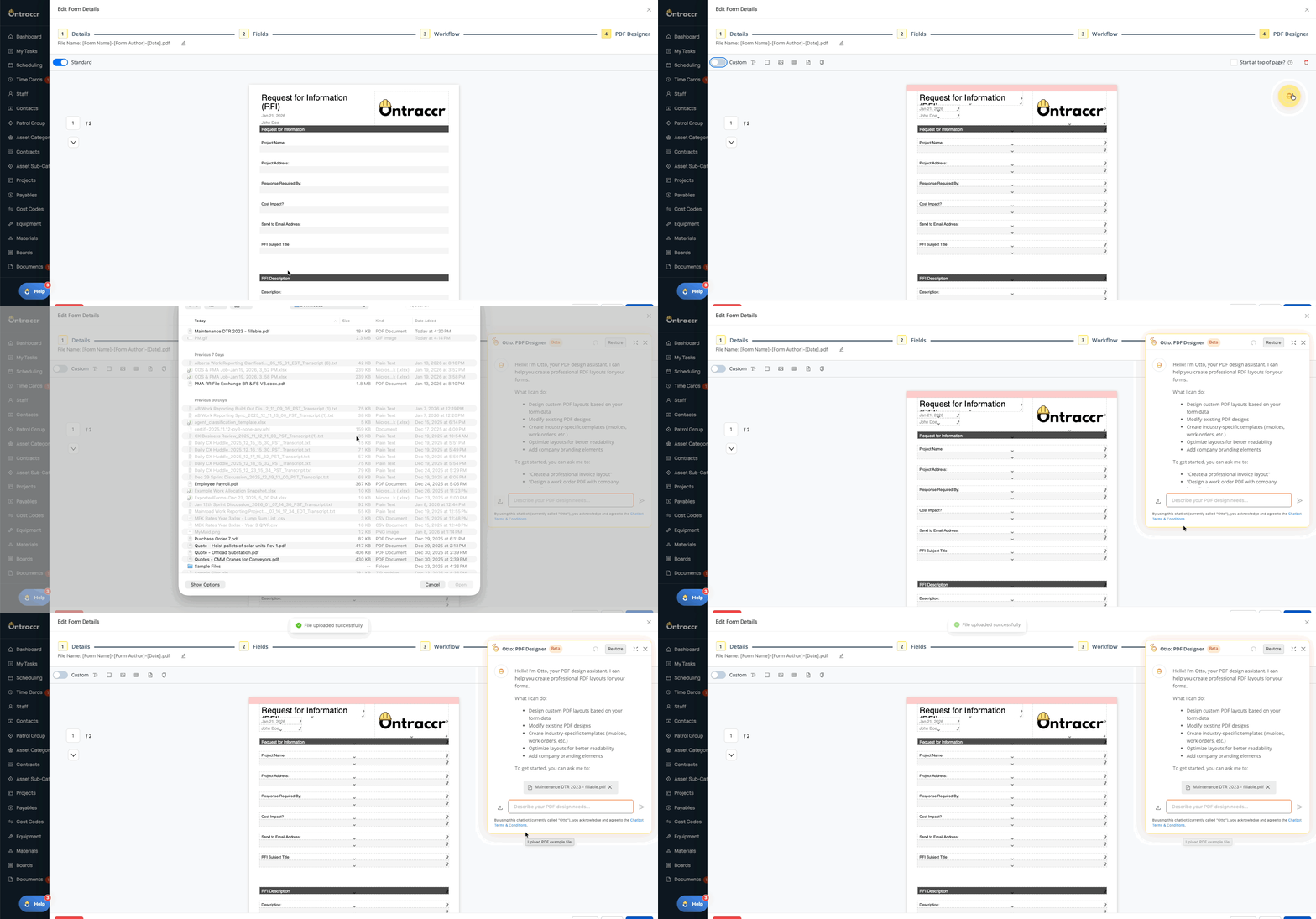
Form Designers can now upload an example template so Otto can reference it when designing the form PDF.
What’s New
- Upload an example PDF (DOCX supported where available)
- Otto references the uploaded file along with your written instructions
- Uploaded file appears above the chat box and can be replaced or removed at any time
- Otto continues to work even without an uploaded reference file
Where to find it
Form Template Design → Step 4 (PDF Design)
Note: This enhancement is available as part of an add-on and requires the feature to be enabled on your account.
See how it works!
Board Filter Profiles with Favourite Defaults
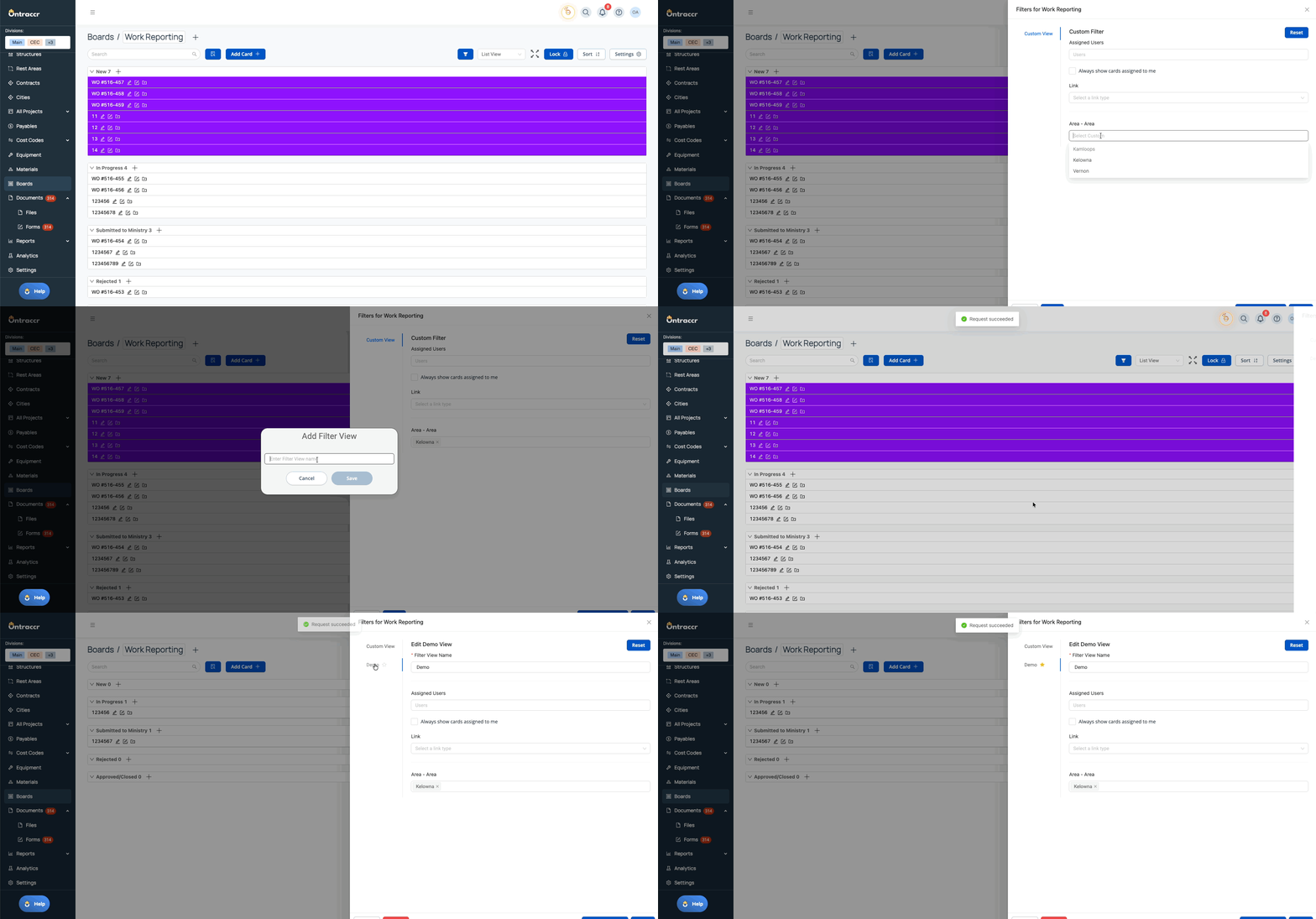
Boards now support saved filter profiles with the ability to favourite one and apply it automatically every time the board is opened.
This helps supervisors and dispatchers focus only on the work orders relevant to them by default.
What’s New
- Save multiple board filter profiles
- Favourite one filter profile per board
- Favourite filter auto-applies when opening the board
- Clear indicator when a board has an active filter
Much like Projects' filter profiles, here’s how board filter favourites work.
⚙️ Web App Improvements & Fixes
- Boards & Projects Page Intermittent Loading Issue: Fixed an issue where Boards and Project pages occasionally required a browser refresh before data loaded correctly.
- Fields Redesign – Phase 1: Part 1 of the Fields redesign is now live, introducing a cleaner, faster, and more intuitive experience when building and managing forms, boards, and more. This first phase refreshes the configuration experience across core field types — from Yes/No fields through GPS fields — laying the groundwork for future enhancements.
- Advanced Search – Export Board Results to Excel: Added the ability to export Advanced Search board results.
- Board Filters – Always Show Assigned Cards: Added an optional setting in saved board filters to always display cards assigned to the user, even if other filter criteria would otherwise hide them.
- Create & Update Board Card Workflow – Include Initials: Workflow steps that append a date/time stamp can now also include the form author’s initials.
- Forms Table Preloading – Draft Edits Preserved: Draft edits to preloaded table data are now retained unless the fields that trigger preloading are changed. A manual “Reload Preloaded Data” action is also available per table.
- Time Entry Drafts – Required Fields Deferred Until Submit: Required Project and Cost Code settings no longer block saving drafts in Time Entry tables.
- Time Entry Tables – Dynamic Blended User Wage: User Wage now reflects a blended rate when manual overtime is used, based on regular, OT, and double OT hours.
- Time Cards – Smart Start & End Times: Time entries intelligently adjust when overlapping entries are added or edited, automatically splitting time ranges when needed.
- Break Duration Column Added: Time Cards, Team Cards, and Summary views now include a Break Duration column that is sortable, filterable, hide-able, and included in exports.
- Employee Payroll Report – Total Hours Column: Added a Total Hours column to the Employee Payroll report.
- Field Schedule – Equipment & Materials on Shifts: Shifts now support selecting equipment and materials, including support when dispatching shifts from the Gantt Schedule.
- Holdback Invoicing from Contract / Progress: Added the ability to generate a Holdback Invoice directly from the Progress page when holdback is enabled.
- QBO Progress Costing – PST Support: Progress tracking now supports optionally including PST from QBO A/P invoices in actual spend calculations.
- Certification Expiry Notifications – Configurable Recipients: Admins can now configure who receives user and vendor certification expiry notifications.
- Sage Intacct Integration Settings Page: Added a new Sage Intacct integration page with setup, deactivation, and import/link tools for Users, Projects, Customers, and Vendors.
- Cost Codes – Custom Categories: Added support for custom cost code categories and category-based eligibility across the platform.
- Cost Codes – Migration to Multi-Category Architecture: Migrated existing cost codes into the new high-level, multi-category framework.
- Cost Codes – Multi-Category Create/Edit UI: Updated the cost code create/edit experience to support selecting multiple categories (feature-flagged).
- Vendor Fields – Add Vendor Inline: Vendor dropdown fields now support inline vendor creation directly from forms.
- Board Cards – Bucket Table Field: Added a new bucket table field type for board cards, including support for parent/child bucket nesting.
- Buckets – Custom Statuses: Buckets now support optional custom statuses configurable per bucket type.
- Equipment Tables – Current Hours & Mileage Columns: Added read-only Current Hours and Current Mileage columns to equipment tables.
- Equipment Workflows – Reset Maintenance Thresholds: Update Equipment workflow steps now support resetting hours and mileage thresholds using form inputs.
- Materials Table – Apply Location to Multiple Rows: When changing a material location, users can apply the change to other relevant materials in the table.
- Form & Work Order Timeline Traceability: Improved timeline hyperlinks between source forms, triggered forms, and created work orders for clearer traceability.
📱 New Features & Enhancements — Mobile App
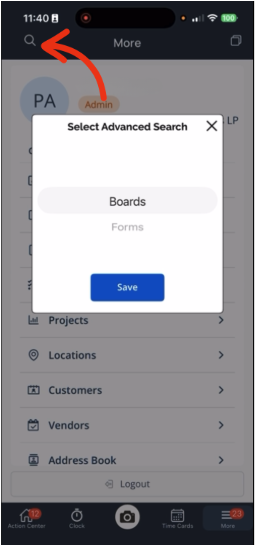
Advanced Search on Mobile
Advanced Search is now available on mobile, enabling field users to run powerful multi-parameter searches across boards and forms.
What’s New
- Search boards or forms using structured conditions
- Create, save, and reuse advanced queries
- Access saved queries created on web
- Results are fully interactive and permission-aware
Note: Advanced Search on Mobile is available as a paid add-on and must be enabled on your account.
Board Card Forms – Sorting & Filtering
The Forms tab inside board cards now supports sorting and filtering on mobile.
What’s New
- Sort by:
- Form Number (Low → High / High → Low)
- Last Updated (Newest → Oldest / Oldest → Newest)
- Filter by:
- Submitter
- Form Template
- Project
- Customer
- Last-used sort is remembered and reapplied automatically

⚙️ Mobile App Improvements & Fixes
- Photo Attachment Descriptions Saving Issue: Fixed an issue where photo descriptions added on mobile were not saving.
- Project Profiles – Attachments Tab Added: Project Profiles now include an Attachments tab on mobile, consolidating all project-related files in one place.
- Shifts – Equipment & Materials Visible: Equipment and materials assigned to shifts are now visible on mobile.
- Dispatch Workflows – Triggered Forms Pop Up: Forms triggered on clock-in or clock-out now appear immediately as pop-ups for mobile users.
- Forms Table Preloading – Draft Edits Supported: Mobile now preserves draft edits for preloaded table data and the Time Tracking Grid.
- Materials Table – Apply Location to Multiple Materials: Mobile supports applying a selected material location to other relevant materials in the table.
- Time Cards – Smart Start & End Times: Smart time behavior for time entries is now supported on mobile.
- Time Entry Drafts – Required Fields Deferred Until Submit: Mobile users can save drafts without Project or Cost Code until submission.
- Equipment Tables – Current Hours & Mileage: Current Hours and Current Mileage columns are now visible on mobile equipment tables.
- Bucket Table Fields – Read-Only Display: Bucket table fields display correctly on mobile in a read-only format.
- Cost Code Category Eligibility Reflected: Mobile now respects cost code category eligibility across time tracking, materials, and equipment workflows.
- Boards – Saved Filter Profiles + Favourite Defaults (Mobile): Boards on mobile now support saved filter profiles, including the ability to favourite one so it automatically applies when opening a board, with a clear indicator when a filter is active.
- Projects – Saved Filter Profiles + Favourite Defaults (Mobile): Projects pages on mobile now support saved filter profiles, including the ability to favourite one so it automatically applies when opening the Projects page (and Project Type pages where applicable), helping users default to only the projects relevant to them.
✅ Update 4.0.4 Summary
Update 4.0.4 delivers major productivity improvements across Boards, Projects, Forms, Search, Cost Codes, PDF design, and Mobile workflows, including saved filter profiles with favourites, Advanced Search on mobile, a major step forward in form configuration redesign, and foundational cost code architecture enhancements.
These updates make Ontraccr more focused, more traceable, and more efficient across both web and mobile.