
Update 4.0.6
🚀 Update 4.0.6 – Release Notes
We’re excited to announce Update 4.0.6 of the Ontraccr web and mobile apps!
This release delivers major upgrades to work order creation quality controls, project setup costing workflows, and web-based time entry—alongside a strong set of usability, reporting/export, and configuration improvements across Boards, Projects, Buckets, Forms, Contracts, and User Management.
Below is the complete list of enhancements, improvements, and fixes.
🧭 New Features & Enhancements — Web App
Conflict Detection During Board Card Creation (Duplicate Prevention)
When creating new board cards, users can now enable Conflict Detection to surface potential duplicate or related records before the card is created.
This helps teams avoid accidentally creating duplicate records when similar cards already exist—for example when dispatching work orders, submitting service requests, logging inspections, or creating project-related tasks tied to the same location, job, or context.
As users complete the form that creates a board card, the system can automatically check existing cards for matches based on configurable fields. If potential matches are found, they are surfaced in a conflict panel so users can quickly review them before proceeding.
What’s New
- Optional Conflict Detection setting in the Create Board Card workflow step
- Admins can configure:
- Which card fields should be used for conflict detection.
- Which fields should be displayed in the conflict results panel.
- Detection runs dynamically as users fill in the form once the required matching fields are present.
- Matching uses an AND condition across the configured fields to determine potential conflicts.
- When matches are found, a conflict indicator appears showing how many potential matches exist.
- Users can open a panel to view the related cards with contextual details such as:
- Card title
- Status
- Last updated timestamp
- Admin-configured contextual fields
- Existing cards can be opened in a view-only slider for quick verification.
- Users can still proceed with creating the new card if needed.
Where to find it
In the Form Workflow Builder → Create Board Card step → Conflict Detection configuration
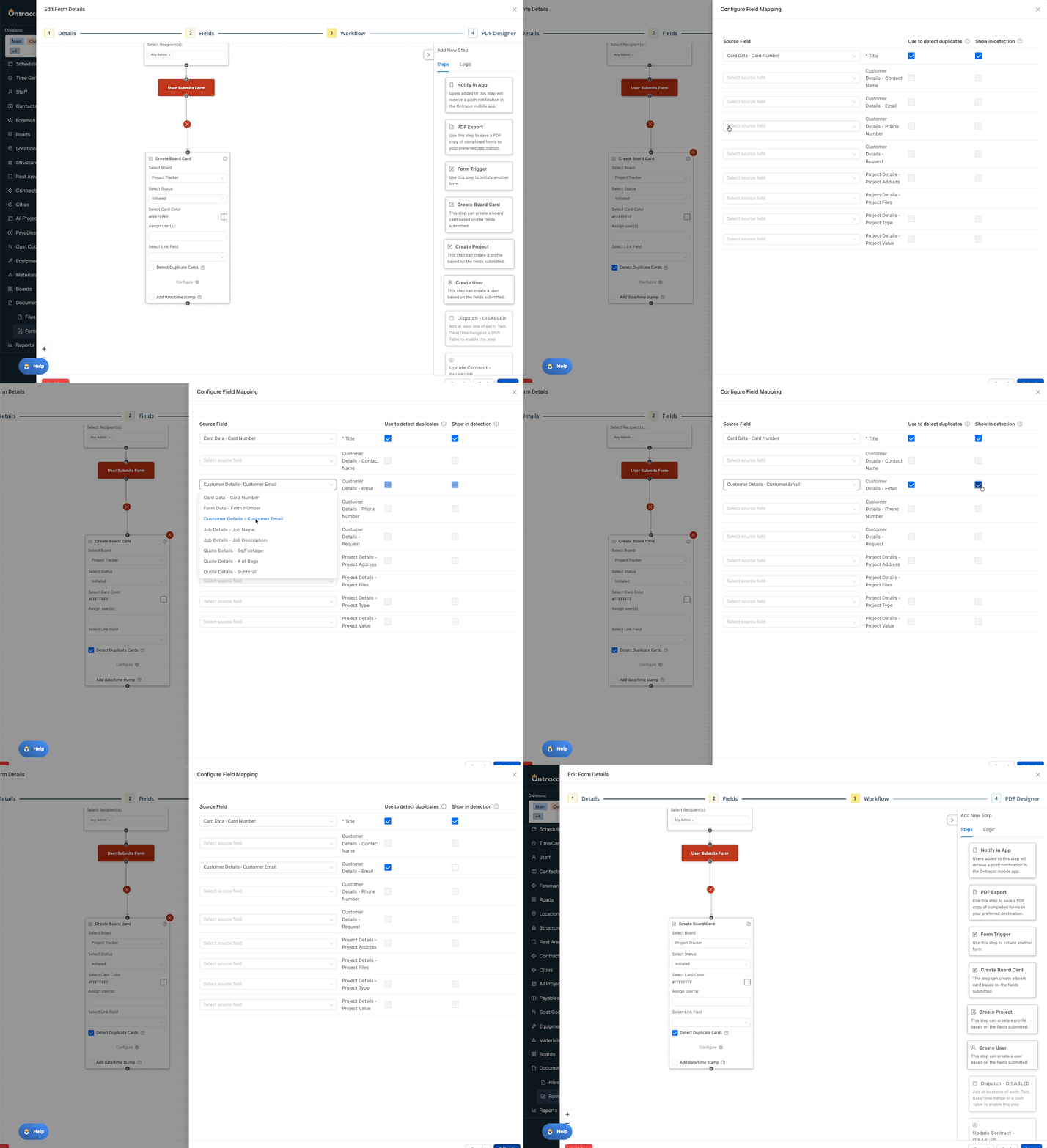
How it performs in action...
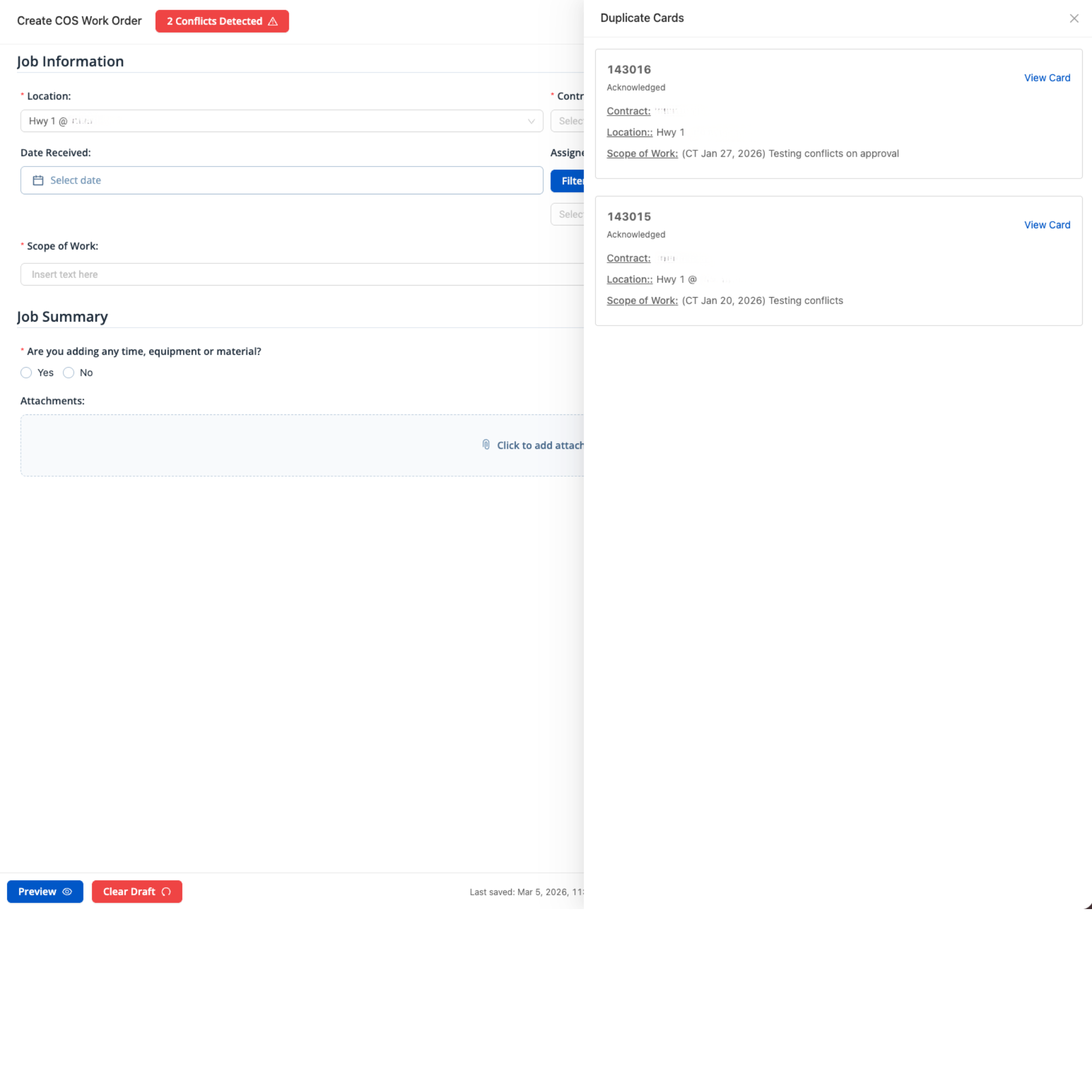
Note
This capability is available for accounts with the Advanced Search add-on enabled.
By surfacing potentially related cards before submission, Conflict Detection helps teams reduce duplicate records and maintain cleaner workflows across boards.
Web App Support for Time Entry Grid View
The Time Card Grid View field is now supported on the Web App, enabling teams to complete grid-style timesheets in the browser—ideal for foremen and supervisors entering crew time and equipment usage from desktop or tablet.
What’s New
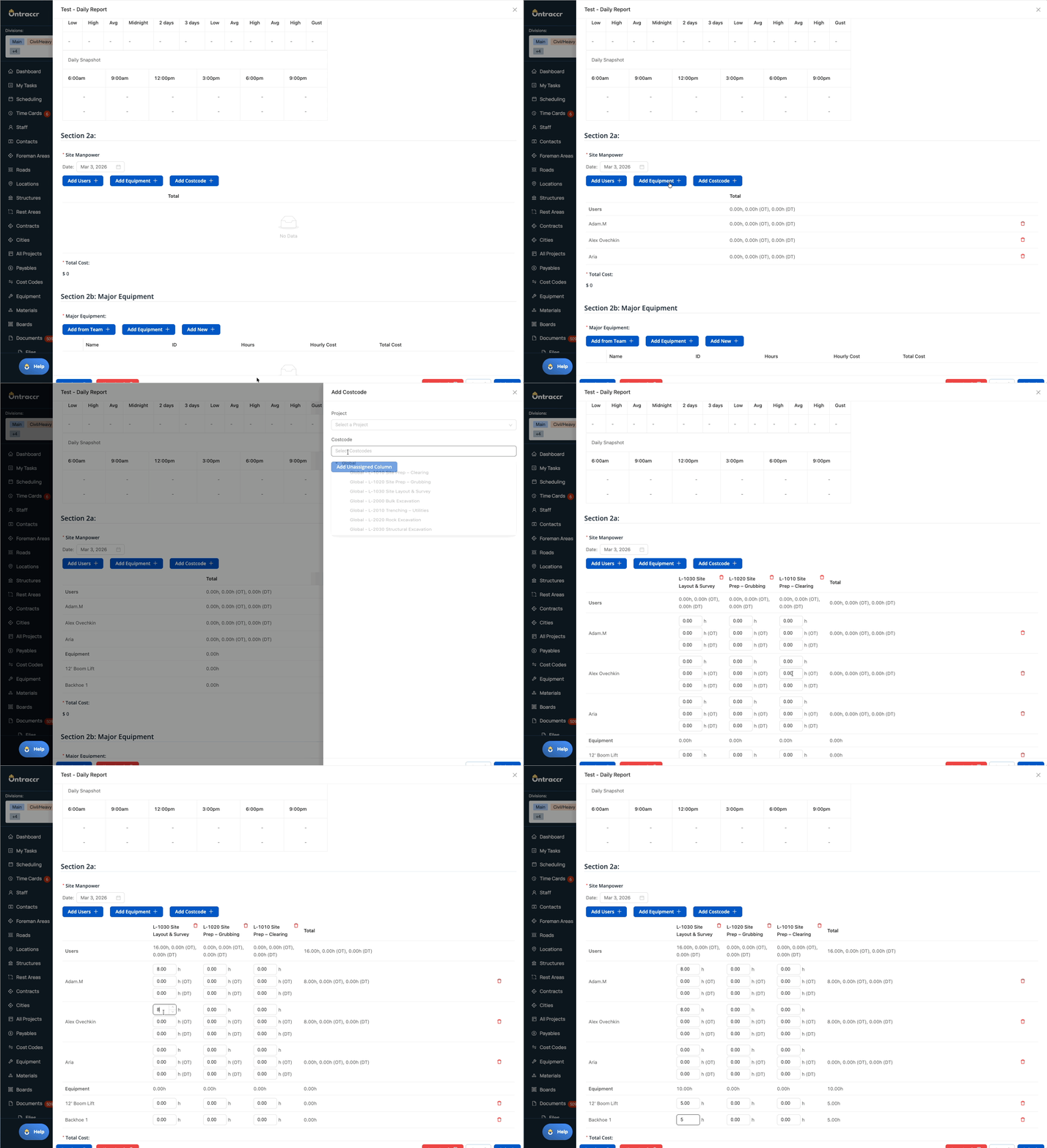
- Full web support for the Grid View time entry experience inside forms.
- Add users and equipment:
- Add individually or by team
- Search by name
- Only shows active users in the same division as the form context (where applicable)
- Add cost codes as columns, including:
- Adding multiple cost codes at once
- Support for project-specific and global cost codes (based on field requirements)
- Prevents duplicate cost code columns
- Supports multiple time types (e.g., Regular/OT/DT where applicable).
- Improved editing experience:
- Update hours directly within grid cells
- Reduced friction when adjusting hours
- Summary bars provide per-column and total rollups (users and equipment).
- Preloading support with a manual “reload” action where preloading is configured.
- Read-only display mode for completed forms (no add/remove actions; no cell editing).
Enter crew time faster with the Time Entry Grid—making it easy to log hours, equipment, and cost codes in a clean, spreadsheet-style layout.
Note
- This feature is hidden behind a paid feature flag.
Grid-based timesheets now work seamlessly on web—fast entry, clean totals, and fewer clicks.
⚙️ Web App Improvements & Fixes
- User Management – Manual Welcome Email Controls: Admins can now send welcome emails to a single user, multiple users, or all eligible users from the Users page, giving teams control over when users receive first-time login access.
- Projects – Redesigned Cost Tracking Setup During Project Creation: Project creation now includes a redesigned, integrated Cost Tracking setup experience that streamlines how teams configure estimates, budgets, cost codes, phases, and templates while creating or editing a project. Cost code setup is now handled directly within the integrated cost tracking flow (replacing the previous standalone Cost Codes tab), and the improved workflow supports phased and unphased cost codes, multi-category cost codes (default and custom categories), and enhanced Job Costing Template management—allowing teams to create, edit, and apply templates during project setup for a cleaner, more streamlined project kickoff experience.
- Create User – “Send Welcome Email” Option: User creation now includes a Send Welcome Email checkbox (enabled by default) so admins can delay welcome emails when creating users ahead of go-live.
- User Certifications Report – Sort by Expiry Date: The User Certifications report now sorts certifications by expiry date so teams can quickly identify what’s expiring next.
- Field & Section Deletion – Confirmation Prompt: Deleting fields or sections in configuration screens now requires confirmation to prevent accidental removals during lag or misclicks.
- Board Timeline – Link Timeline Dates to Custom Date Fields: Boards can now map a date/date-range card field to timeline dates so timeline visibility updates automatically when the linked field is filled.
- Form PDF Designer – Reduced Minimum Table Row Height: Table header and row minimum heights can now be reduced further for more compact PDF table layouts (supported in both v2 and v3 PDF designers).
- Custom Time Tracking Exports – Conditional Logic Honoured in Multi-Field Columns: Conditional logic is now respected in Custom Time Tracking Exports so multi-field columns only output values that are actually active/visible based on conditions.
- Time Entry Workflows – Map Static Text Outputs into Exportable Time Tracking Fields: Static Text fields from form-based time tracking can now map into Text Input time tracking custom fields, allowing conditional “cost item” outputs to appear in Custom Time Tracking Exports.
- Progress Billing Contract Export – Adjustable Field Spacing: Contract exports now support configurable spacing between field labels and values, improving layout control and preventing unnecessary wrapping for long values.
- Projects Page – Filter by Bucket Values: When Bucket columns are enabled on the Projects page, users can now filter projects by one or more values within the selected bucket.
- Board Filters – Support for Dynamic Attribute Fields: Board filters and saved filter profiles now support filtering by Dynamic Attribute field values, enabling views based on resolved, attribute-driven data.
- Equipment Forms – Auto-Populate Equipment Tables: When launching an equipment-linked form from an equipment record, the equipment table can now auto-preselect the initiating equipment so users can complete remaining table columns faster.
- Bucket & Project Group Profiles – Wider Profile Slider: Bucket and Project Group profile sliders have been widened to match the project profile slider width, reducing horizontal scrolling—especially on the Forms tab.
- Buckets – Alphabetical Sorting on Bucket Profile Pages: Bucket pages now include name sorting (A→Z / Z→A) with the selected sort preference preserved for consistent navigation.
📱 New Features & Enhancements — Mobile App
- Time Entry Table – Inline Editing No Longer Blocks Submission: Fixed an issue where inline edits in a Time Entry table could prevent form submission on mobile.
- Board Filters – Support for Dynamic Attribute Fields (Mobile): Mobile board filters now support filtering by Dynamic Attribute field values, matching web behavior for saved filter views.
- Equipment Forms – Auto-Populate Equipment Tables (Mobile): Equipment-linked forms opened from an equipment record can now auto-preselect that equipment in the equipment table, matching web behavior.
✅ Update 4.0.6 Summary
Update 4.0.6 introduces major improvements to how teams create work orders, set up project costing during creation, and complete grid-based timesheets on the web—helping reduce duplicates, streamline project kickoff configuration, and speed up time entry.
This release also strengthens reporting/export accuracy, improves configuration safety and usability across the platform, and delivers practical workflow parity updates on mobile—making Ontraccr more controlled, more efficient, and easier to operate at scale.