
Update 5.0.3
🚀 Update 5.0.3 – Release Notes
To ensure optimal performance and reliability, Ontraccr recommends using the latest version of Android or iOS on all mobile devices. Our applications are tested against the most recent operating system versions, and support for older versions is not guaranteed. Devices unable to run current OS versions may experience degraded performance or functionality.
We're excited to announce Update 5.0.3 of the Ontraccr web and mobile apps!
This release introduces Close PO Workflow Automation, alongside improvements to Equipment Management, Forms, Board Cards, Time Tracking, Schedule of Values, and workflow automation. Teams also gain enhanced reporting, more flexible configuration options, and a refreshed Analytics experience.
Below is the complete list of enhancements, improvements, and fixes.
🧭 New Features & Enhancements — Web App
Close PO Workflow Automation
Purchase Order closing just got more powerful!
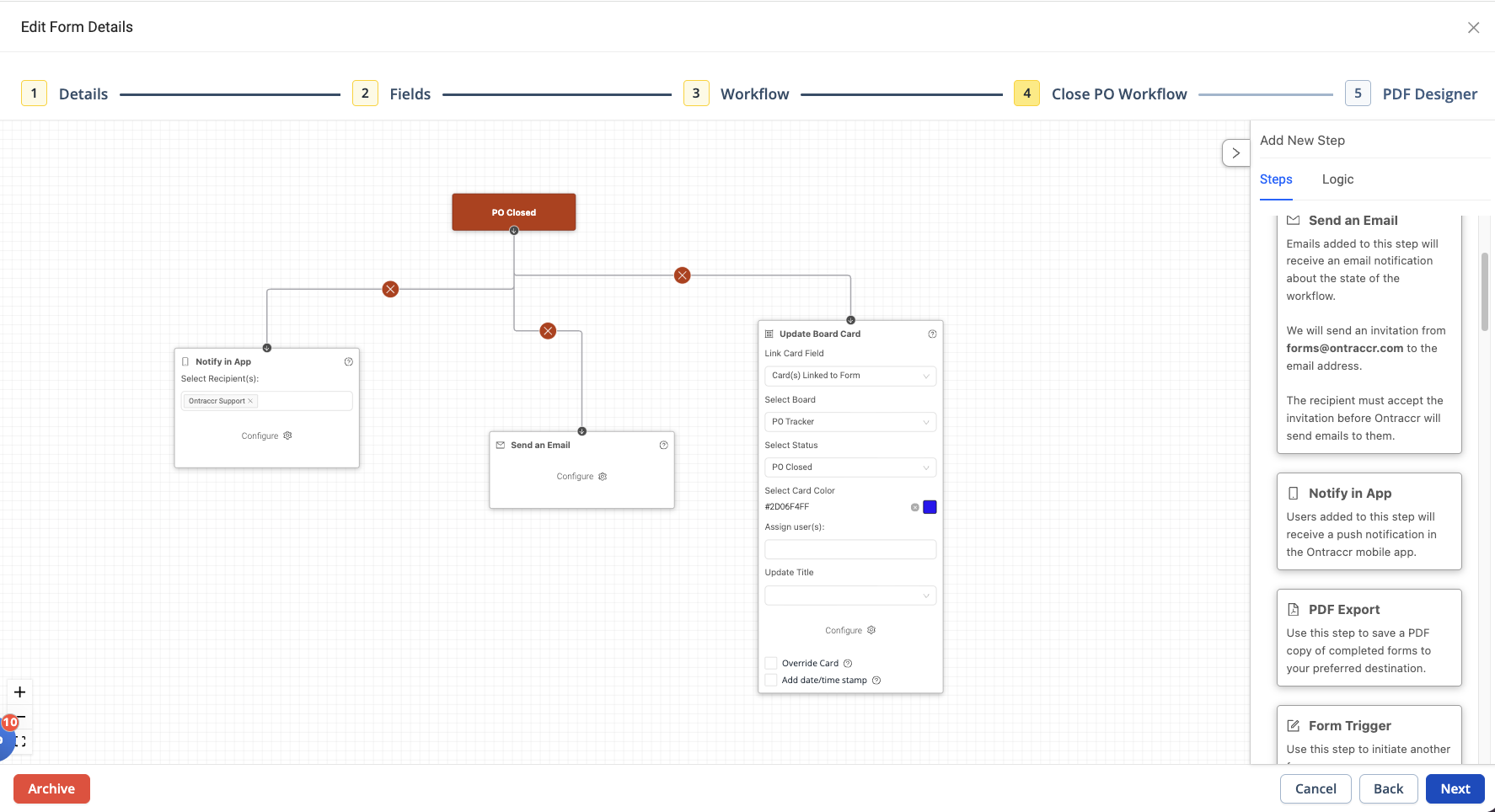
Update 5.0.3 introduces a dedicated Close PO Workflow, allowing teams to automatically trigger additional actions when a Purchase Order is closed.
Previously, closing a PO required separate manual steps to update Board Cards, notify team members, or continue related processes. With this enhancement, these actions can now be automated directly through the Form Workflow Builder.
What's New
- Dedicated Close PO Workflow Tab: Purchase Order Form Templates now include a separate workflow tab with a PO Closed trigger.
- Automatic Workflow Execution: Configured workflows execute when a Purchase Order is closed.
- Expanded Automation Options: Trigger actions such as creating or updating Board Cards, sending emails, scheduling notifications, triggering Forms, and more.
- Advanced Workflow Logic: Supports applicable Approval steps, Time Delays, and Logical Conditions.
With Close PO Workflows, teams can automate the next stages of their purchasing and project management processes without additional manual intervention.
Here's a look at the new Close PO Workflow Builder:
⚙️ Web App Improvements & Fixes
- Reset Schedule of Values Columns: Authorized users can now reset values in supported Schedule of Values columns, including progress, billing, invoice, and quantity fields. Resets require password confirmation and are recorded in the SOV history, including the user, affected columns, and date/time.
- Automated Equipment Threshold Reports: Configure daily email reports summarizing Equipment approaching or exceeding maintenance thresholds. Reports include Equipment details, current usage, threshold values, and supported custom fields, organized by proximity to or severity of the threshold. Administrators can customize recipients, email content, delivery time, and weekend exclusions. Separate custom email content is also supported for Equipment Hours and Mileage threshold warnings.
- Equipment Timer Display in Days and Hours: Equipment timers now display durations of 24 hours or more using a days-and-time format, such as
1d 02:15:30. Shorter durations retain the standardHH:MM:SSformat. This also applies to Current Hours and Total Lifetime Hours within Equipment Usage. - Updated Files List for Users and Equipment: User and Equipment Files tabs now feature an updated list-style interface with image thumbnail previews and support for opening PDFs, Excel files, images, and videos.
- Time Entry Creation Failure Notifications: Administrators now receive email notifications when Time Entries fail to be created through Form workflows. Notifications identify the originating Form and affected entries, including relevant employee, date, and project information, helping teams identify missing Time Entries before payroll processing.
- Percentage-Based Bulk Material Cost Adjustments: Bulk Material Cost updates now support percentage-based increases and decreases alongside fixed dollar adjustments. Changes are calculated against each Material's existing cost, with previews displaying updated costs, markups, and prices before saving.
- Quantity Remaining Column for Allocated Materials: Material Tables now support a read-only Quantity Remaining column, displaying available quantities based on allocated and used amounts. Administrators can configure live calculations or static mapped values, while visual warnings highlight potential over-allocation. The column is also supported in Form PDFs.
- Expanded Board Workflow Automation and Alerts: Board Workflows can now trigger actions based on Date/Time or Date Range fields on Board Cards. A new trigger also detects when a Card has not reached an expected status by a configured date or duration. Supported actions include email notifications, Task creation, and Card colour changes, helping teams automate deadline monitoring and follow-ups.
- Project Name and Number Sorting & Filtering for Forms: The Forms Log, Assigned, Approved, and Manual views now support sorting and filtering by Project Name and Project Number. Available columns respect the company's Project Label setting, and both filters can be applied simultaneously where supported.
- Revert Schedule of Values Holdback Amounts: Users can now revert holdback amounts associated with individual SOV submissions without changing the original invoice amounts. Reversals adjust the accumulated holdback total while preserving amounts recorded in other submissions. This applies to newly created SOV submissions.
- Customizable Cost Tracking and Progress Columns: Users can now show or hide columns across supported Cost Tracking and Progress tables, including Budget & Actuals, Cost Codes, Phases, Subcontracts, and Uncategorized costs. Column preferences are saved per user and table within the browser, reducing unnecessary horizontal scrolling.
- Display Linked Tasks on Board Cards: Boards can now display up to three associated Tasks and their current statuses directly on Cards. Administrators can choose which statuses appear, while users can update Task statuses without opening individual Cards. Task information automatically reflects changes to the underlying Tasks.
- Export Board Card Notes to Excel: Board Card Notes can now be exported to Excel, including the Card title, associated link information, original author, creation date/time, and latest Note content. Notes are organized chronologically, and tagged users are displayed by name.
- Edit and Delete Board Card Notes: Authorized users can now edit or delete existing Board Card Notes. Edited Notes retain their original author and date while identifying the latest editor and edit time. Attachment changes are reflected on the Card, and permissions follow the Board's Edit All or Edit Assigned configuration.
- User Profile Dynamic Attributes for Time Cards: Time Card Custom Fields can now automatically populate information from the associated User's profile. Supported Text and Choose One or More values are available in Time Entry Tables, Custom Exports, and applicable Eclipse synchronization, reducing repetitive data entry.
- Role-Based Form Reassignment Permissions: Form Templates now support reassignment permissions by User Role. Administrators can control which Forms a Role can reassign and whether users can assign Forms to anyone or only themselves. Existing templates retain their previous reassignment behaviour unless reconfigured.
- Edit Start Times on Active Time Clocks: Authorized users can now correct an employee's clock-in time while the clock is still running. Changes update the active timer and are recorded in the Time Card history after clock-out, with applicable edit indicators, automatic breaks, and rounding supported.
- Create Contacts Directly Within Forms: Users can now create new Contacts directly from applicable Contact/Address Book fields without leaving the Form. Contacts can be associated with existing Customers or Vendors, with linked selections automatically populated where applicable. Saved Contacts become available in the Form's dropdown.
- Directly Close Purchase Orders from the PO List: Purchase Orders can now be closed directly from the Payables list using a new Direct Close option. Users can alternatively continue opening the PO Form before closing it, preserving the existing process.
- Search Projects During Equipment Check-In: Equipment check-in now includes a searchable Project list, allowing users to locate Projects by Name, Number, or configured Project Label. The updated interface also supports checking Equipment in or out and switching between Projects or Locations.
- Reactivate Exported Alberta Work Reports: Exported Alberta Work Reports can now be changed back to Active, allowing users to make additional corrections without recreating the report.
- Configurable Equipment Hours Display and Rounding: Equipment Table Hours and Current Hours columns now support Show Full Values, Round Down, Round Up, and Round to Nearest. Formatting is respected in Forms, PDFs, linked Time Entry Tables, calculations, and supported Board Card mappings.
- Automatic SOV Invoice Submission Through Form Workflows: The Update Contract workflow step now includes an optional Auto Submit Invoice on SOV Page setting. When enabled, Form submission automatically finalizes the associated SOV invoice/progress draw, updates previously billed values, and creates an SOV Log entry, eliminating the separate Contract-page submission.
- Improved Schedule of Values PDF Formatting: Schedule of Values PDFs now display percentage values correctly, such as
25.00%, and currency values with thousands separators. The Invoice column is also included with its corresponding amounts. - Greek Symbol Support in V3 Forms and PDFs: V3 Forms now support Greek symbols such as Ω and μ in applicable fields, labels, dropdowns, and Tables. These characters are also preserved in supported Standard and Custom PDFs, workflow-generated PDFs, Custom Exports, and Advanced Search.
- N/A Support for Check All in Yes/No Fields: The Check All feature now supports N/A alongside Yes and No. Selecting N/A updates applicable fields within the section while respecting individual Hide N/A settings. Responses are also reflected correctly in generated PDFs.
- Automatic Equipment Maintenance Threshold Warning Updates: Equipment maintenance warnings are now recalculated when usage or threshold values change through supported Equipment workflows, helping ensure maintenance indicators reflect the latest Equipment information.
- Disable Automatic Field Pre-Fill from Board Cards: Form builders can now disable automatic pre-population for supported User and Card dropdown fields when Forms originate from Board Cards. Explicit Board Form Mappings continue to populate their configured values.
- Configurable Eclipse Equipment Field Mapping: Eclipse integration settings now allow administrators to map Equipment data to Ontraccr's native ID and Name fields and supported Equipment Custom Text Fields. Configured mappings are applied during imports and ongoing synchronization, with existing default behaviour preserved when no mappings are configured.
- Pending Attachment Support for Board Cards: Attachments awaiting Form approval now appear on Board Cards with a distinct muted appearance and source Form information. Pending files can be previewed and automatically become regular attachments following approval.
- Configurable Board Card Conflict Searches During Form Approval: Approvers can now use Configure Search while reviewing Forms awaiting approval. Users can adjust conflict detection conditions, search for potential duplicate Board Cards, and open matching Cards directly from the approval interface.
- Time Card Approval Routing and Approver Visibility: Time Card timelines now identify the applicable Company, Project, or Team Supervisor approval process and display the users or teams responsible for pending approvals. Multi-stage approvals and resubmissions are supported, making outstanding approvals easier to track.
- Refreshed Analytics Visualizations and Dashboard Styling: Analytics charts now feature updated styling across Line, Bar, Pie, and Stacked Line visualizations. Dashboard widgets also receive lighter borders, rounded corners, and subtle shadows, with additional visual improvements across Advanced Search Analytics and Project Progress/Cost Tracking charts.
⚙️ Mobile App Improvements & Fixes
- Equipment Timer Display in Days and Hours: Equipment timers now display durations of 24 hours or more using a days-and-time format, such as
1d 02:15:30, making extended Equipment usage easier to interpret. - Updated Files List for Users and Equipment: User and Equipment Files tabs now feature refreshed list views with image thumbnails and support for opening PDFs, Excel files, images, and videos.
- Redesigned Billing Tab: Project and Customer Billing tabs have received a visual redesign, with continued support for Billing Rates, Material markups/discounts, and searchable Invoice lists.
- Quantity Remaining for Allocated Materials: Mobile Material Tables now display available quantities through the new Quantity Remaining column, supporting live calculations, mapped values, and visual over-allocation warnings.
- Time Card Custom Fields During Live Clock In/Out: Mobile and Tablet Mode users can now complete Time Card Custom Fields while clocked in. Required fields are validated when clocking out or switching, with support for conditional logic, attachments, signatures, applicable permissions, and offline mobile time tracking.
- User Profile Dynamic Attributes for Time Cards: Mobile Time Cards now support automatically populated Custom Fields linked to User profile information, including supported Text and dropdown values within Time Entry Tables.
- Role-Based Form Reassignment Permissions: Mobile Form reassignment now respects the new Role-based permissions, controlling which Forms users can reassign and whether they can assign them to themselves or other users.
- Visibility Into Edited Clock-In Times: Mobile Time Cards now display indicators identifying clock-in times adjusted through the supported active clock editing functionality.
- Search Projects During Equipment Check-In: Mobile Equipment check-in now supports searching by Project Name, Number, or configured Project Label, making Project selection faster while preserving existing check-in, check-out, and switching functionality.
- Configurable Equipment Hours Display and Rounding: Mobile Equipment Tables now respect the configured Hours Display settings, including full values and whole-hour rounding, across supported Forms, calculations, and Board Card mappings.
- Expanded Character Support in V3 Forms: Mobile Forms now support special characters, including Greek symbols such as Ω and μ, within applicable Form fields, labels, and tables. These symbols display correctly when completing and reviewing Forms, allowing users to accurately capture technical measurements and information.
- N/A Support for Check All in Yes/No Fields: Mobile users can now apply N/A to applicable Yes/No fields within a Form section using Check All, while respecting individual Hide N/A settings.
- Disable Automatic Field Pre-Fill from Board Cards: Mobile Forms now respect the Disable pre-fill from card setting for supported User and Card dropdowns, while preserving explicitly configured Board Form Mappings.
- Pending Attachment Support for Board Cards: Mobile Board Cards now display pending attachments with visual indicators and preview functionality. Attachments automatically transition to regular files following Form approval.
- Configurable Board Card Conflict Searches During Form Approval: Mobile approvers can now adjust conflict detection conditions and review matching Board Cards directly when approving Forms with configurable conflict searches enabled.
- Improved Schedule Filtering on Smaller Screens: Resolved an issue where Schedule filtering controls could become hidden on smaller mobile displays. Published/Draft switches and Selected/Other User lists now remain accessible.
✅ Update 5.0.3 Summary
Update 5.0.3 expands Ontraccr's workflow automation capabilities with the introduction of Close PO Workflows, while delivering improvements across Equipment Management, Forms, Boards, Time Tracking, and project costing.
New reporting and configuration options, enhanced Schedule of Values functionality, improved Board Card management, and expanded Time Tracking capabilities give teams greater control over their daily operations. Mobile users also benefit from improved Form functionality, Equipment management, and a refreshed Billing interface.
Together, these updates help teams reduce manual work, improve visibility, and manage operational processes more efficiently across the Ontraccr web and mobile apps.