
Update 5.0.0
🚀 Update 5.0.0 – Release Notes
To ensure optimal performance and reliability, Ontraccr recommends using the latest version of Android or iOS on all mobile devices. Our applications are tested against the most recent operating system versions, and support for older versions is not guaranteed. Devices unable to run current OS versions may experience degraded performance or functionality.
We’re excited to announce Update 5.0.0 of the Ontraccr web and mobile apps!
This major release introduces the new Workflow Marketplace for importing complete, ready-made workflows and a completely redesigned Ontraccr mobile app experience. It also adds custom columns to Form Tables, form-number generation before submission, preconfigured Shift Table reminders, more precise material markups, expanded multi-user certification workflows, and extensive performance and app optimizations.
Together, these updates make it easier to launch connected workflows, navigate and personalize the mobile app, access important field information, configure forms, automate reminders, and manage operational data more accurately across Ontraccr.
Below is the complete list of enhancements, improvements, and fixes.
🧭 New Features & Enhancements — Web App
Workflow Marketplace
Launch complete, connected workflows faster with Ontraccr’s new Workflow Marketplace.
The Workflow Marketplace gives teams a simpler way to introduce common operational processes without building every piece from the ground up. Instead of importing only an individual form or board, users can bring an entire end-to-end workflow into their account—including the connected forms, boards, custom fields, statuses, buckets, workflow steps, profile or time-card fields, labels, billing rates, and other supporting configuration the process requires.
The Marketplace launches with five ready-made workflows, giving teams practical starting points that can be imported for immediate use. Teams can spend less time assembling individual pieces and more time putting the workflow to work. The catalogue will continue to grow over time, bringing more common construction workflows into Ontraccr and making it easier for teams to expand how they use the platform.
What’s New
- Access the new Workflow Marketplace from the top-right navigation of the web app.
- Browse workflow options through a visual, tile-based experience with clear names, graphics, and descriptions.
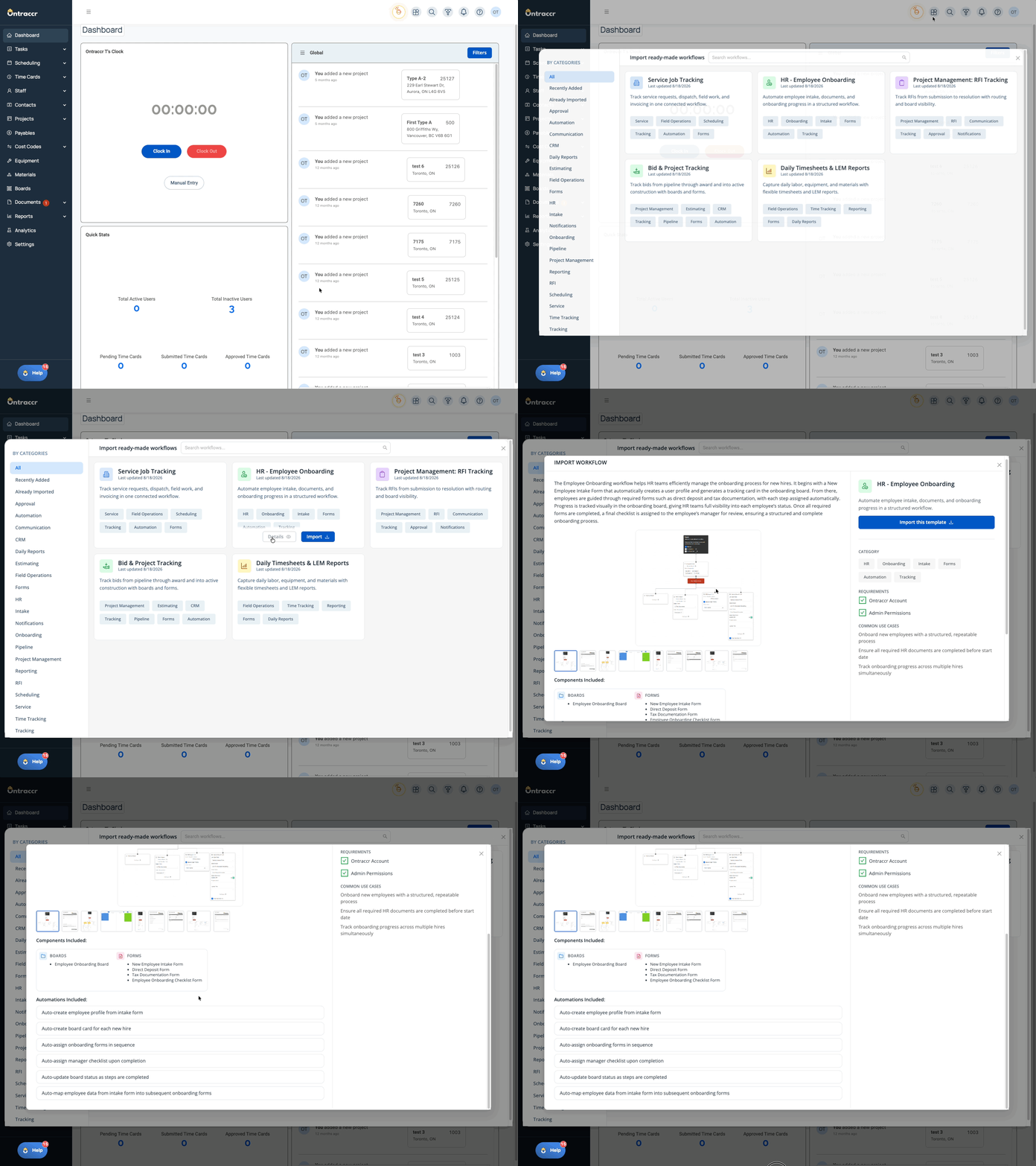
- Open any workflow to understand its purpose, see how it can be used, and preview screenshots of the forms, boards, fields, and other elements included.
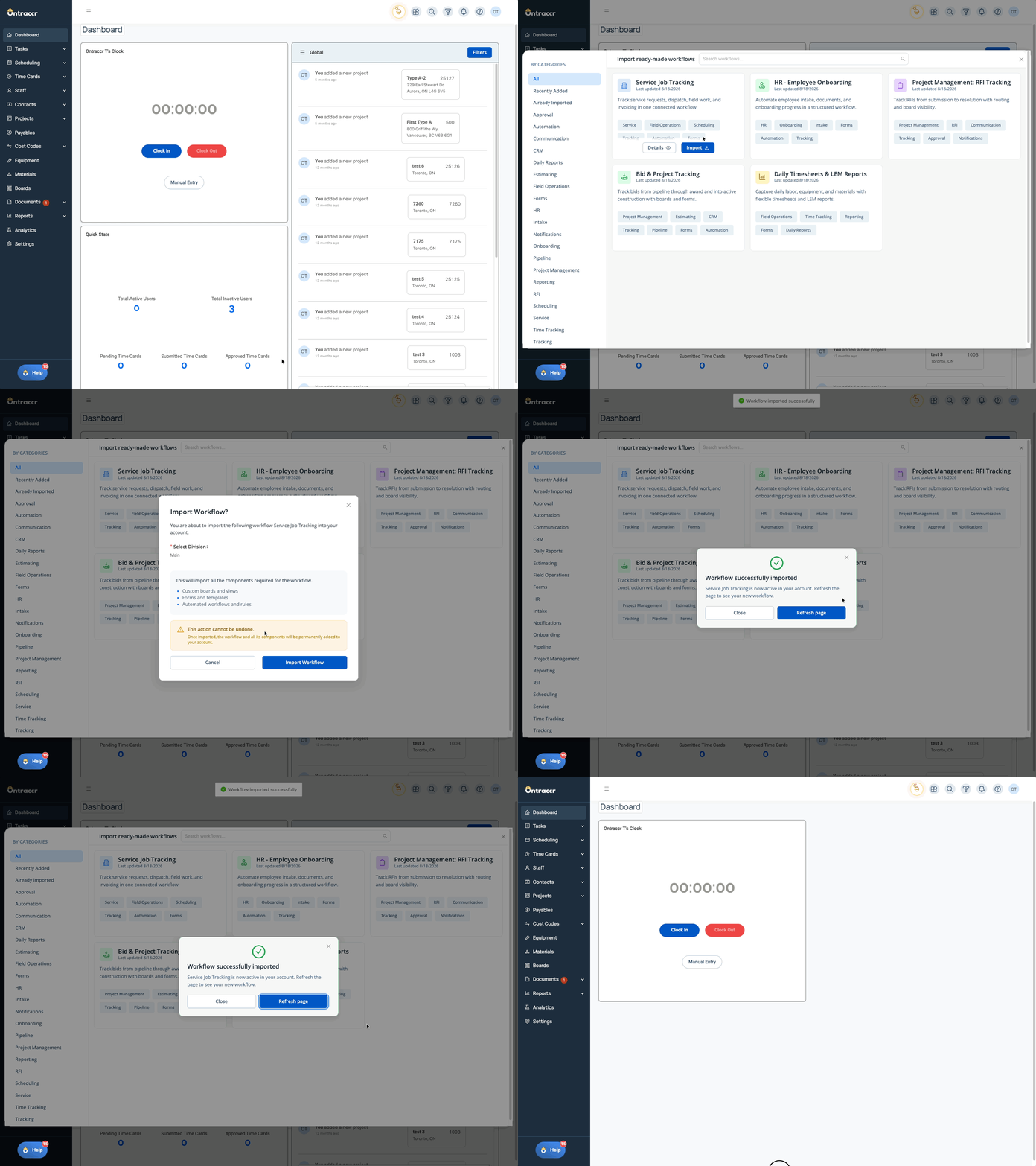
- Import all required workflow components through one guided experience.
- Control access through a dedicated Workflow Marketplace role permission that is available to Admins by default.
See Exactly What Each Workflow Includes
Open any workflow to review its full description and preview the connected forms, boards, fields, and other components before adding anything to your account. Here’s a look at how users can explore the complete workflow details before importing:
Bring the Full Workflow Into Your Account
Once the right workflow has been selected, choose the applicable division, confirm the import, and let Ontraccr add the connected components required for the process. Here’s a look at the guided workflow import experience:
⚙️ Web App Improvements & Fixes
- Exact Decimal Markups for Material Pricing: Material Markup and Labour Markup fields can now accept, save, and display percentages containing up to five decimal places without automatically rounding the entered value. Sell-price calculations use the exact percentage provided, while resulting prices continue to be truncated to two decimal places. Support includes creating, updating, and viewing materials; Material Form Tables; material uploads for Markup; and bulk updates for Markup.
- Preconfigured Schedule Reminders in Shift Tables: Form builders can now configure schedule reminders directly from a Shift Table. Reminder recipients can be linked automatically to the selected customer’s email or populated from supported Text Input and Attribute fields, including email attributes associated with customers, contacts, projects, vendors, or users. Configured external reminders and self-reminders are applied when the linked Dispatch step creates the shifts, reducing the need to configure each reminder manually.
- Custom Columns for Native Form Tables: Form builders can now add custom text columns to supported native Form Table types. Custom columns can be renamed, restricted by user or position, hidden from PDFs, configured for numeric input, or formatted as currency with a dollar prefix and two decimal places. Column names must be unique within each table. Values can be entered inline, used in table calculations and Calculation fields, included in custom exports and generated PDFs, and mapped between tables through supported form and board workflows when the custom-column names match. Custom Tables are excluded from this functionality.
- Generate Form Numbers Before Submission: Form Types now include an option to generate a form number as soon as a user manually opens a form while online. The number appears in the form header, remains associated with saved drafts, and carries through to the Assigned Forms list and submitted Form Log. Standard form numbers remain unchanged if the project changes, while project-unique form numbers update with the selected project and maintain a separate sequence for each project.
- Create Certifications for All Users Selected in a Multi-User Field: The Create Certification workflow step now supports User dropdown fields configured for multiple selections. When a multi-user field is mapped into the step, Ontraccr creates an individual certification for every selected user and carries the configured issuer, acquired date, expiry date, files, and custom-field values into each certification record.
- Custom PDF Support for Automatically Collected Signatures: Automatically collected signatures now render reliably in configured custom PDFs. Signatures and their associated date, time, and geolocation metadata remain available when a mobile-submitted form is edited and approved through an editable approval step on web.
🧭 New Features & Enhancements — Mobile App
Completely Redesigned Mobile App Experience
Update 5.0.0 introduces a completely redesigned Ontraccr mobile app experience, with refreshed navigation, a new Apps page, personalized Quick Access, redesigned Action Center widgets, streamlined Settings, and extensive performance and app optimizations.
The redesign reorganizes how users move through the app while preserving the features, permissions, data, history, integrations, and login access they already use. Nothing has been removed—the tools users previously accessed through More are now organized on the Apps page, and familiar functionality remains available through the updated experience.
What’s New
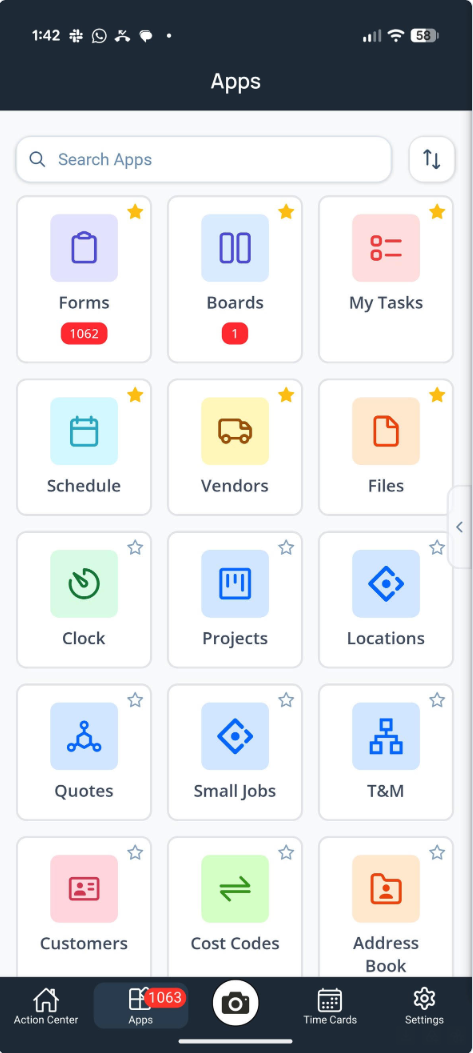
- A New Apps Page: The former More experience has been replaced by a tile-based Apps page, which now occupies Clock’s previous position in the bottom navigation. Clock remains available through Apps and the Action Center. Apps provides access to Ontraccr pages and tools such as Forms, Boards, Clock, My Tasks, Schedule, projects, customers, vendors, files, materials, equipment, users, teams, uploads, and more. Available Apps respect company naming, user permissions, configured project types, and applicable feature access.
- Search, Sorting, and Favourites: Users can search Apps by name; sort by default order, favourites, recently used, A–Z, or Z–A; and favourite the pages they use most. Favourite and sorting selections persist across app sessions.
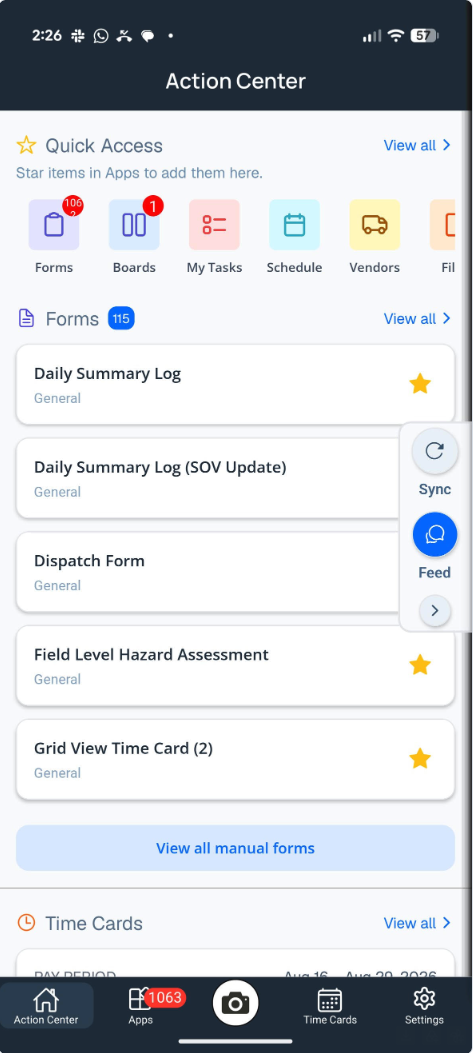
- Personalized Quick Access: Favourited Apps appear in a Quick Access row at the top of the Action Center, giving users a direct path to the tools they use most often. Quick Access remains hidden until the user selects at least one favourite.
- Useful App Badges: The Apps navigation badge combines assigned forms, approval forms, and tagged board-card notes. Individual Forms, Boards, and Uploads tiles surface their applicable counts, including failed uploads, so users can see where attention is required.
- Redesigned Action Center Widgets: Forms, Submissions, Schedule, Board Cards, Tasks, Equipment, Time Cards, and Clock have been refreshed to provide clearer information and faster access to common actions.
- Schedule shows today’s assigned shifts, shift timing and colours, and links to the full calendar or available shift actions.
- Board Cards shows assigned cards and provides a searchable, filterable, and sortable view of all cards assigned to the current user.
- Forms provides direct access to recent assigned forms, favourite forms, or configured manual forms, while Submissions surfaces the user’s five most recent form submissions.
- Tasks shows active assigned work and allows users to update task status or access an attached form directly from the widget.
- Equipment shows equipment associated with the project the user is currently clocked into and supports equipment check-in and checkout actions.
- Time Cards displays completed hours for today and the current pay period, breaks hours down by submission status, and surfaces the most recent completed entry.
- Sync and Live Feed Side Drawer: Sync and Live Feed are now available from a slide-out drawer on the Action Center, Apps, Time Cards, and Settings tabs, so users can access them without returning to the Action Center first.
- Streamlined Settings: Settings now focuses on the individual user’s account options, including Change Password, Clear Image Cache, Support, Feedback, and Logout. Operational pages and tools are available through Apps.
- Broad Performance and App Optimizations: This release includes extensive under-the-hood refinements designed to make the mobile experience faster, smoother, and more responsive as Ontraccr continues investing in app performance.
The redesigned experience is delivered automatically. Users can close and reopen Ontraccr to access the updated mobile app without downloading a separate App Store or Google Play update.
Here’s a quick look at the redesigned Ontraccr mobile app experience:
The all-new Apps page..
The all-new Action Center..
✅ Update 5.0.0 Summary
Update 5.0.0 marks a major evolution of Ontraccr’s workflow and mobile experiences while delivering new flexibility across forms, materials, scheduling, certifications, and PDFs.
The new Workflow Marketplace gives Admins a faster way to import complete, connected workflows—including the forms, boards, fields, statuses, automation, and supporting configuration required for an end-to-end process. The Marketplace launches with five workflow options, and the available catalogue will continue to grow over time.
The completely redesigned Mobile App introduces a new Apps page, personalized Quick Access, redesigned Action Center widgets, more accessible Sync and Live Feed controls, streamlined Settings, and broad performance and app optimizations. The updated interface reorganizes the experience without removing existing features or changing users’ data, permissions, history, integrations, or login access.
Together, these updates help teams launch workflows faster, reach important tools more easily, manage field activity more efficiently, and work with greater accuracy across the Ontraccr web and mobile apps.