
Update 4.0.8
🚀 Update 4.0.8 – Release Notes
To ensure optimal performance and reliability, Ontraccr recommends using the latest version of Android or iOS on all mobile devices. Our applications are tested against the most recent operating system versions, and support for older versions is not guaranteed. Devices unable to run current OS versions may experience degraded performance or functionality.
We’re excited to announce Update 4.0.8 of the Ontraccr web and mobile apps!
This release introduces a new audit-focused timeline for form templates, expanded data capture capabilities within material and equipment tables, and enhanced mobile reliability with improved draft handling and background processing. Together, these updates strengthen data integrity, improve field usability, and provide greater visibility into system changes across both web and mobile workflows.
Below is the complete list of enhancements, improvements, and fixes.
🧭 New Features & Enhancements — Web App
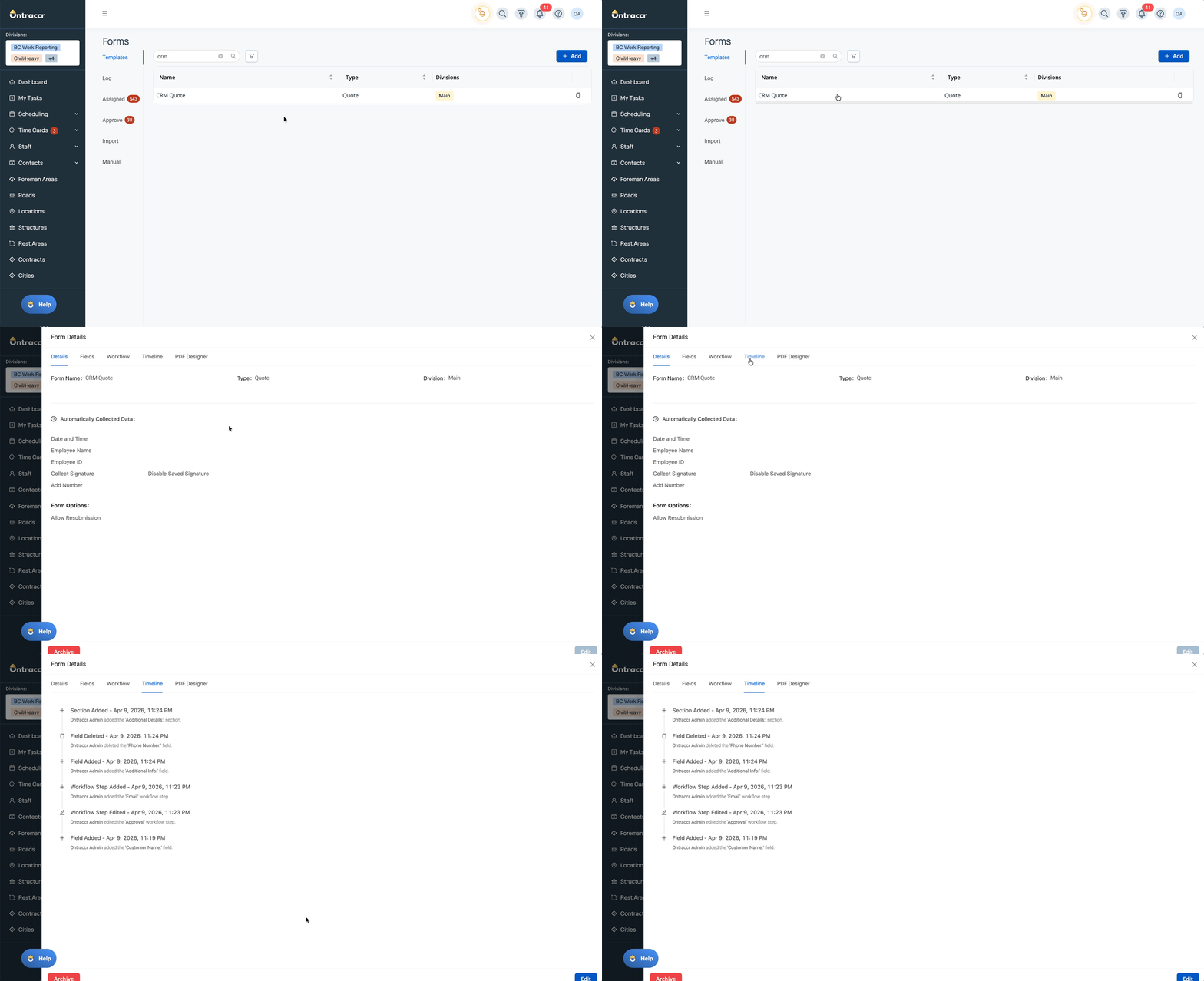
Form Template Timeline (Change History)
Gain visibility into how your form templates evolve over time with the new Timeline tab, providing a clear audit trail of changes made to fields, sections, and workflow steps.
This feature allows administrators to quickly identify who made updates, what was changed, and when—helping improve accountability and transparency across form configuration and workflow design.
The timeline is designed as a lightweight first version, focusing on high-level change tracking without introducing unnecessary complexity.
What’s New
- New Timeline tab available when viewing existing form templates
- Displays a chronological history of changes, including:
- Field additions, edits, and deletions
- Section additions, edits, and deletions
- Workflow step additions, edits, and deletions
- Each entry includes:
- User name (shows “You” for current user)
- Timestamp of the change
- Type of change (added, edited, deleted)
- Name of the field, section, or workflow step
Watch how easily you can track every change with the new Timeline feature:
⚙️ Web App Improvements & Fixes
- Material & Equipment Tables – Attachment Column Support: Material and Equipment table fields now support a new Attachment column, allowing users to upload and associate files directly with individual line items. Users can upload up to three attachments per row from system files or device uploads, with support for common file types such as images, PDFs, and spreadsheets. Attachments can be viewed, downloaded, and removed from both draft and submitted forms, and are also surfaced in the Attachments tab across profiles and board cards. Attachment values are preserved across workflow mappings, including Create Card, Update Card, and Update Form actions.
- Materials & Equipment – Vendor Linking Across Profiles and Tables: Materials and Equipment can now be linked directly to Vendor profiles, replacing the previous text-based supplier field with a structured relationship. Vendor values are visible on both Materials and Equipment pages (including sorting and export support), and can also be used within table fields in forms. When a material or equipment item is added to a table, the associated vendor is automatically pre-filled and can be adjusted via a dropdown. Vendor selections are preserved across workflow mappings and ensure consistent vendor attribution throughout project workflows.
⚙️ Mobile App Improvements & Fixes
- Time Entry Table – Start/End Time Inline Editing Fix: Resolved an issue where Start and End Time fields were not immediately editable when adding team entries to a Time Entry table. Users can now access the time picker without needing to first enter a value in the time column, improving consistency and reducing friction during time entry.
- Forms – Background File Uploads for Attachments: Forms with attachments now submit immediately while files upload asynchronously in the background. Uploads continue even if users navigate away from the form, close the app, or terminate the session. A new in-progress uploads experience allows users to monitor active uploads, view failures, and retry as needed, while workflows are automatically deferred until all files are successfully uploaded.
- Board Forms – Manual Save Draft Support: Board forms on mobile now support manual draft saving, allowing users to safely exit and return to forms without losing progress. Saved drafts appear in both the Assigned Forms page and within the board form launch flow, where users can reopen, edit, and submit them. This brings mobile behavior in line with the existing web experience.
- Forms – Offline Draft Support Across All Form Types: Users can now save and manage form drafts while offline across all form types, including manual forms, assigned forms, board forms, and equipment forms. Drafts can be created, edited, and stored locally without connectivity, with clear confirmation when saved. Once reconnected, users can reopen drafts, complete them, and submit as normal, with offline drafts syncing seamlessly to the system.
- Material & Equipment Tables – Editable “Date Added” Column: The Date Added column in material and equipment table fields is now editable on mobile. Users can select dates using a calendar picker, with the current date preloaded by default. Updated values persist across drafts and submissions and correctly map through workflow steps, ensuring accurate tracking of material and equipment usage.
- Material & Equipment Tables – Attachment Column Support: Material and Equipment tables on mobile now support the new Attachment column, enabling users to upload, view, and manage files directly within table rows. Users can capture images via camera or upload files from their device, with support for multiple attachments per row and full compatibility with draft, submission, and workflow mapping behaviors.
- Materials & Equipment – Vendor Linking Across Profiles and Tables: Vendor linking for Materials and Equipment is now supported on mobile, allowing users to view and assign vendors directly within profiles and table fields. Vendor values are pre-filled when linked at the profile level and can be adjusted within form tables, ensuring consistent vendor tracking across mobile workflows and field operations.
✅ Update 4.0.8 Summary
Update 4.0.8 introduces new visibility into form configuration changes with the Form Template Timeline, expands data capture capabilities within material and equipment workflows through attachment and vendor support, and significantly improves mobile reliability with offline drafts and background file uploads.
These enhancements help teams maintain stronger data accuracy, reduce operational friction in the field, and improve transparency and control across both configuration and execution workflows in Ontraccr.