
Update 4.0.12
🚀 Update 4.0.12 – Release Notes
To ensure optimal performance and reliability, Ontraccr recommends using the latest version of Android or iOS on all mobile devices. Our applications are tested against the most recent operating system versions, and support for older versions is not guaranteed. Devices unable to run current OS versions may experience degraded performance or functionality.
We’re excited to announce Update 4.0.12 of the Ontraccr web and mobile apps!
This release introduces conditional PDF visibility controls, a new Grid View experience, improved time-entry preloading and duplicate prevention, global controls for time card submission and approval, stronger project-based form privacy, and new Advanced Search insights.
Together, these updates help teams create cleaner customer-facing PDFs, manage time tracking workflows more accurately, improve project-level access control, and gain clearer insights from targeted search results.
Below is the complete list of enhancements and improvements.
🧭 New Features & Enhancements — Web App
Conditional PDF Visibility for Empty Fields and Sections
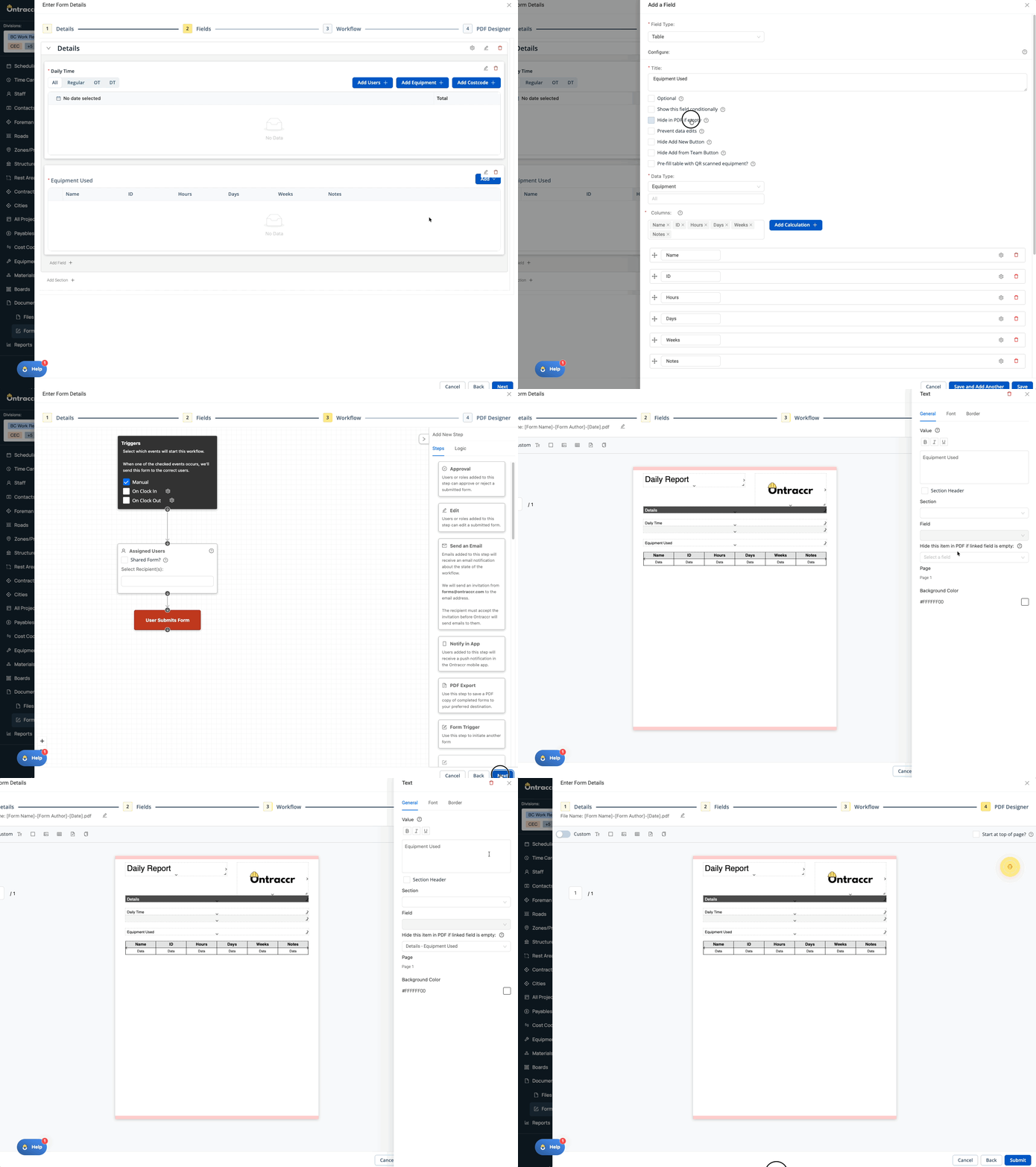
PDF Designer now includes conditional visibility options for V3 forms, helping teams create cleaner PDFs when sections or fields are not used.
Users can configure applicable fields to hide from PDFs when left empty. When an entire configured section contains no data, the section—including its header, field labels, and field inputs—can be hidden from the generated PDF. This is especially useful for customer-facing forms where optional sections, such as equipment details, should not appear when they are not relevant.
What’s New
- V3 form fields can be configured to hide in the PDF when empty.
- Empty configured sections can be hidden from the PDF when all applicable fields are empty.
- Section headers, field labels, and field inputs are hidden along with an empty section.
- If even one applicable field contains data, the section continues to display normally.
- Standard PDF templates move subsequent fields upward when empty fields are hidden.
- Custom PDF text items can be linked to another field and hidden when that linked field is empty.
- NOTE: This functionality is available for V3 forms only.
Here’s a look at how conditional PDF visibility can keep optional form sections out of customer-facing PDFs when no data has been entered:
Completely Redesigned Grid View
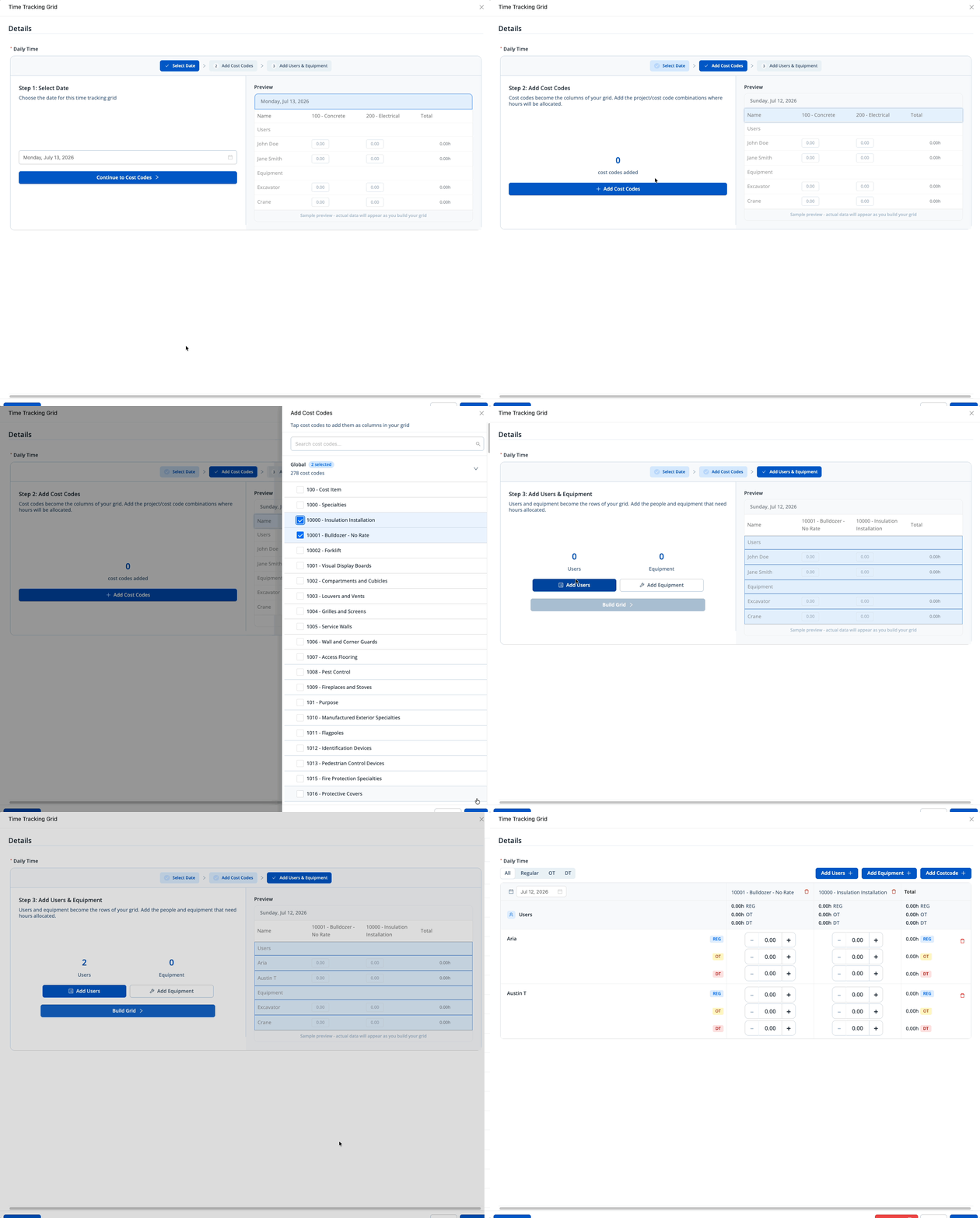
The Time Tracking Grid has been completely redesigned to give teams a faster, cleaner, and more intuitive way to build and use grid-based time entry workflows.
The new interface modernizes the entire Grid View experience, making it easier to configure grids, enter data, review information, and manage complex time-entry workflows without unnecessary friction. Whether teams are capturing labour, equipment, cost codes, or multiple time types, the updated design provides a more streamlined and efficient workspace for both office and field users.
What’s New
- A completely new Grid View interface designed for a cleaner, more efficient user experience.
- Updated grid-building experience to make configuring grid-based workflows easier.
- Improved edit-mode experience for entering and updating grid data.
Here’s a look at the completely redesigned Grid View experience:
⚙️ Web App Improvements & Fixes
- User-Based Dynamic Attributes: Dynamic Attributes can now use Users as their source in Forms and Boards. This allows user-profile data, such as designations or other configured user information, to populate related Dynamic Attributes automatically. User-based Dynamic Attributes are also supported when board cards are created through Create Board Card workflows.
- Time Tracking Grid – Preload Existing Time and Equipment Entries: Time Tracking Grids can now preload existing time and equipment entries from Time Cards. Preloading can be configured from Forms or Time Entries and filtered by a static or linked date, project, and cost code. Grids preloaded from Time Entries are read-only for Create/Update Time Entry workflows, while Form-preloaded grids retain their existing create/update behaviour.
- Duplicate Prevention for Duration-Based Time Entries: Duplicate prevention and conflict checks now support hour-based time entries in addition to time-based entries. This helps identify true duplicate duration entries—such as entries created again through a resubmitted form—without preventing legitimate separate duration entries on the same day. The updated behaviour applies to conflict warnings, Create Time Entry workflows, and manual entries.
- Project Type Selection in Create Project Board Automations: The Create Customer and/or Project board workflow now includes a Project Type selection. Workflow builders can select from available project types so new projects are categorized correctly when created through a status-change or card-created automation. Projects continue to use the None/default type when no Project Type is selected.
- Advanced Search Insights for Yes/No Fields: Advanced Search now supports analytics-style insights for Yes/No fields on Forms and Boards. Users can add multiple applicable insights, choose supported chart and breakdown options, and click a Yes or No chart segment to filter the current search results accordingly. Saved queries retain enabled analytics, and the field selector has been widened to better display longer field names.
- PDF Checklist Display for “Choose One or More” Fields: V3 forms now support configurable PDF display options for checkbox and radio-style Choose One or More fields. By default, PDFs continue to show selected values. When configured to Show All, PDFs display every available option and clearly show selected and unselected choices while respecting the field’s configured styling and horizontal or vertical layout. Dropdown-style fields continue to use their existing PDF behaviour.
- Global Time Card Submission and Approval Setting: Companies can now enable or disable time card submission and approval system-wide from Time Tracking settings.
- Form Log Visibility by Assigned Project: A new, disabled-by-default Only Assigned Project Forms permission is available under View Master Form Log. When enabled for a role, submitted forms associated with projects are visible only to users assigned to those projects directly or through a team. Forms without a project association continue to follow existing form and template permissions.
⚙️ Mobile App Improvements & Fixes
- User-Based Dynamic Attributes: Mobile now supports User-based Dynamic Attributes in Forms and Boards, including Dynamic Attributes populated through Create Board Card workflows.
- New Grid View: Mobile and tablet users now have access to the new Grid View experience. The updated grid supports edit and view modes, Create Time Entry workflows, users, equipment, cost codes, Regular/OT/DT hours, totals, and summary rows.
- Time Tracking Grid – Preload Existing Time and Equipment Entries: Mobile Time Tracking Grids can now preload time and equipment entries using configured date, project, and cost-code filters. The same preload and Create/Update Time Entry restrictions available on web are supported on mobile.
- Duplicate Prevention for Duration-Based Time Entries: Mobile conflict checks, Create Time Entry workflows, and manual entries now support duplicate prevention for hour-based time entries, alongside existing time-based conflict detection.
- PDF Checklist Display for “Choose One or More” Fields: Mobile supports the updated V3 PDF behaviour for checkbox and radio-style Choose One or More fields, including configured Show Selected and Show All display options.
- Pending Time Card Details: Pending time cards now display their available details in the mobile Time Cards page for approval-based time-entry workflows. Pending cards are identified with an orange border until approved, cannot be edited or deleted while pending, do not trigger conflict warnings, and contribute hours to the Team Cards daily and weekly overview.
- Global Time Card Submission and Approval Setting: Mobile and tablet now respect the global Time Card Submission and Approval setting. When disabled, related submit, approve, reject, approver, and auto-submit behaviour is hidden or disabled across supported mobile workflows.
- Form Log Visibility by Assigned Project: Mobile form logs now respect the Only Assigned Project Forms permission. Forms tied to projects users are assigned to directly or through a team remain visible, while forms tied to unassigned projects are hidden. Forms without a linked project continue to follow existing permissions.
- Board Card Creation Conflict Detection: Mobile now supports conflict detection when creating board cards. For supported Text, Yes/No, dropdown, Date Time Range, and Date Time fields, users can see potential duplicate cards when all configured matching conditions are met. A conflict count opens a slider with configured duplicate-card details, and users can open the existing card in a view-only interface. Conflict detection is also supported during applicable form approval and approval-edit workflows.
✅ Update 4.0.12 Summary
Update 4.0.12 delivers major improvements to PDF design, time tracking, project privacy, Advanced Search, board workflows, and mobile field workflows.
Conditional PDF Visibility gives teams more control over how optional fields and sections appear in V3 form PDFs, while the new Grid View provides an updated experience for grid-based time entry workflows across web, mobile, and tablet. Time tracking is further enhanced with time and equipment preloading, improved duplicate prevention for duration-based entries, and a company-wide setting to disable time card submission and approval where it is not needed.
This release also introduces User-based Dynamic Attributes, Project Type selection in Create Project board automations, Yes/No insights in Advanced Search, full checklist PDF display options, project-based Form Log visibility, and mobile support for pending time card details and board-card conflict detection.
Together, these updates help teams manage forms, PDFs, time entries, project access, boards, and operational data more accurately and efficiently across Ontraccr.