
Update 4.0.10
🚀 Update 4.0.10 – Release Notes
To ensure optimal performance and reliability, Ontraccr recommends using the latest version of Android or iOS on all mobile devices. Our applications are tested against the most recent operating system versions, and support for older versions is not guaranteed. Devices unable to run current OS versions may experience degraded performance or functionality.
We’re excited to announce Update 4.0.10 of the Ontraccr web and mobile apps!
This release introduces new Custom Overtime Profiles for more flexible time tracking rules, new Certification Type Management for standardized user and vendor certifications, expanded font controls in the PDF Designer, enhanced equipment workflow automation, broader equipment rate support, improved project association handling for edited forms, and expanded Mass Import capabilities.
Together, these updates give teams more control over overtime and certification setup, improve PDF formatting flexibility, streamline equipment and time tracking workflows, and make it easier to import and manage operational data across Ontraccr.
Below is the complete list of enhancements, improvements, and fixes.
🧭 New Features & Enhancements — Web App
Custom Overtime Profiles
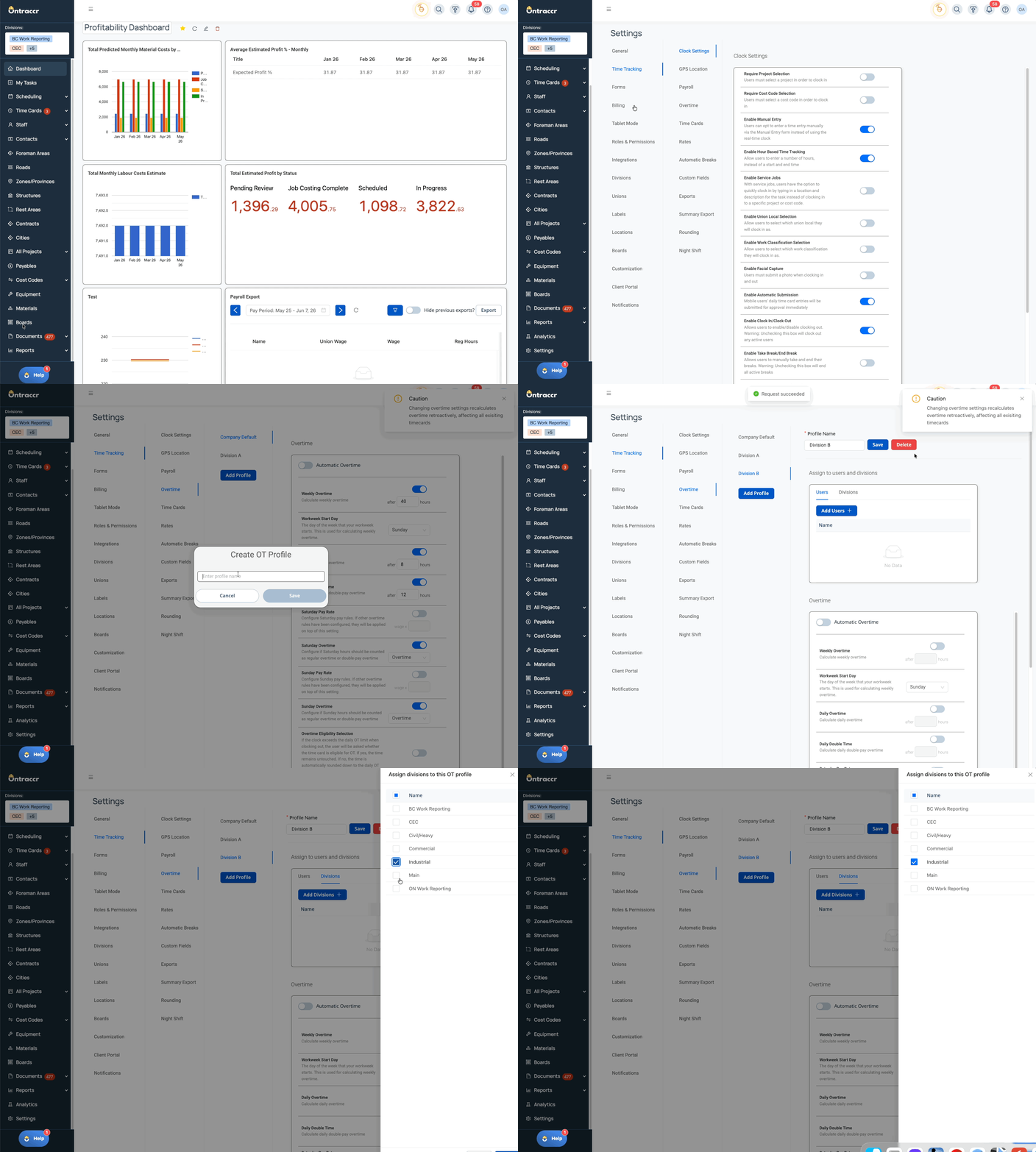
Companies can now create and assign custom overtime profiles, giving administrators more flexibility when configuring overtime rules for different teams, divisions, and users.
Instead of relying only on company-wide overtime settings, admins can now create unique overtime profiles and assign them to specific divisions or individual users. This helps support companies with different overtime policies across crews, locations, divisions, or employee groups.
Overtime profiles follow a clear hierarchy:
User → Division → Company
This means a user-specific overtime profile takes priority first, followed by a division-level profile, and then the company default if no more specific profile applies.
What’s New
- New support for creating custom overtime profiles in Time Tracking settings
- Custom overtime profiles can be assigned to:
- Specific users
- Entire divisions
- Users without a direct overtime profile assignment can inherit the applicable division profile
- Users without a user or division profile continue to use the company default overtime settings
- If a user or division profile is deleted, the system falls back to the next available overtime setting level
- Admins can assign overtime profiles from overtime settings
- Admins can also manage overtime profile assignments from user profiles and division settings
- User profiles now show which overtime profile is being used
- Time cards, payroll reports, exports, manual entries, clock-in/clock-out workflows, and analytics use the applicable overtime profile when calculating overtime
Here’s a look at how you can implement Custom Overtime Profiles to manage different overtime rules across users and divisions:
New Font Controls and Expanded Font Options for PDF Designer
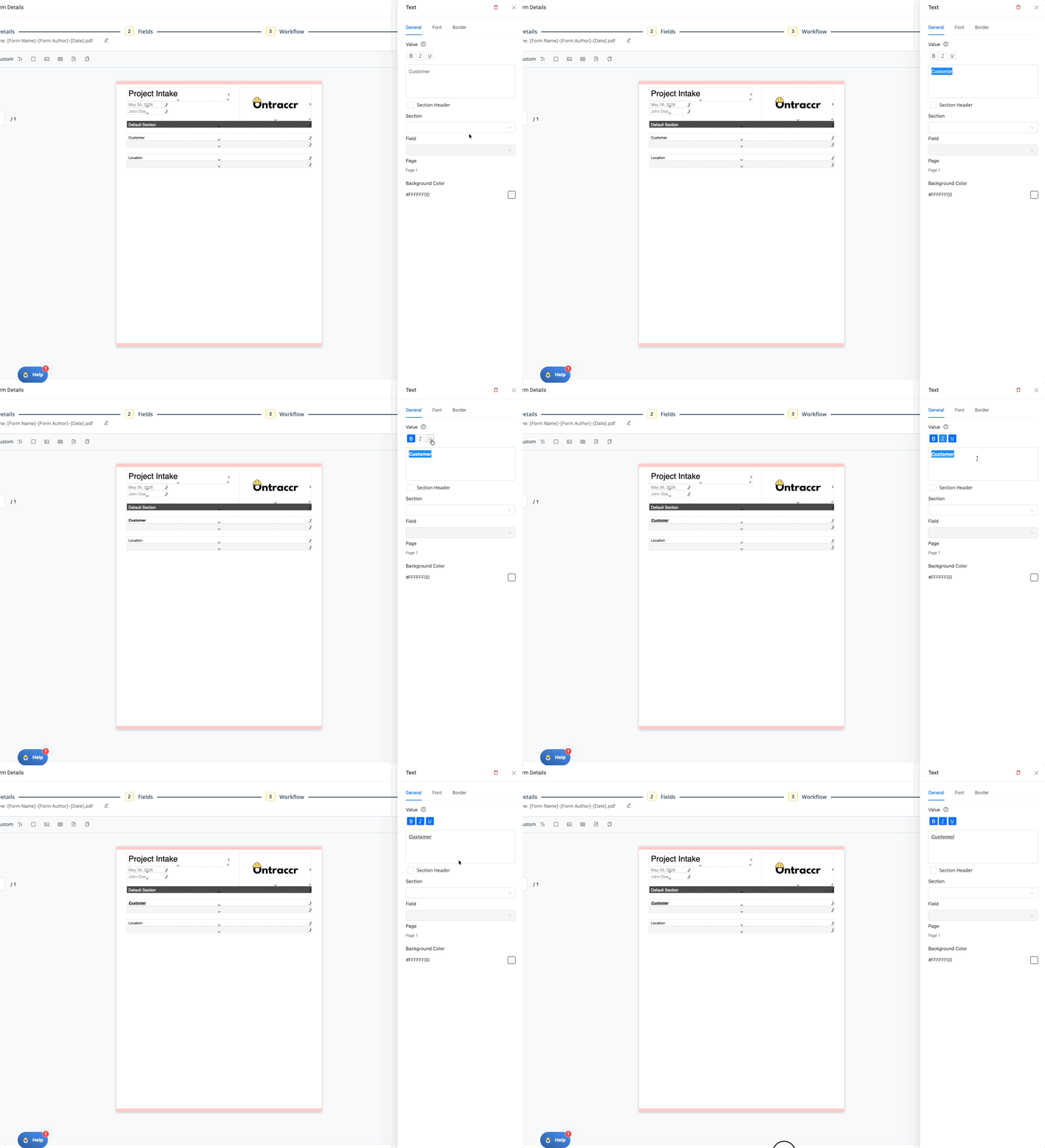
The PDF Designer now includes expanded text formatting controls, giving users more flexibility when designing PDFs for forms, workflows, and customer-facing documents.
Users can now apply formatting to specific parts of a text element instead of applying formatting to the entire text box. This makes it easier to create polished, readable PDFs with emphasized labels, instructions, headings, variables, and other important details.
What’s New
- Text elements in the PDF Designer now support:
- Bold
- Italic
- Underline
- Supported variables can also use the new formatting options
- PDF Designer now includes additional font options, including:
- Montserrat
- Open Sans
- Roboto
- Lato
- Raleway
- Urbanist
Here’s a look at the new PDF Designer text formatting experience:
Certification Type Management
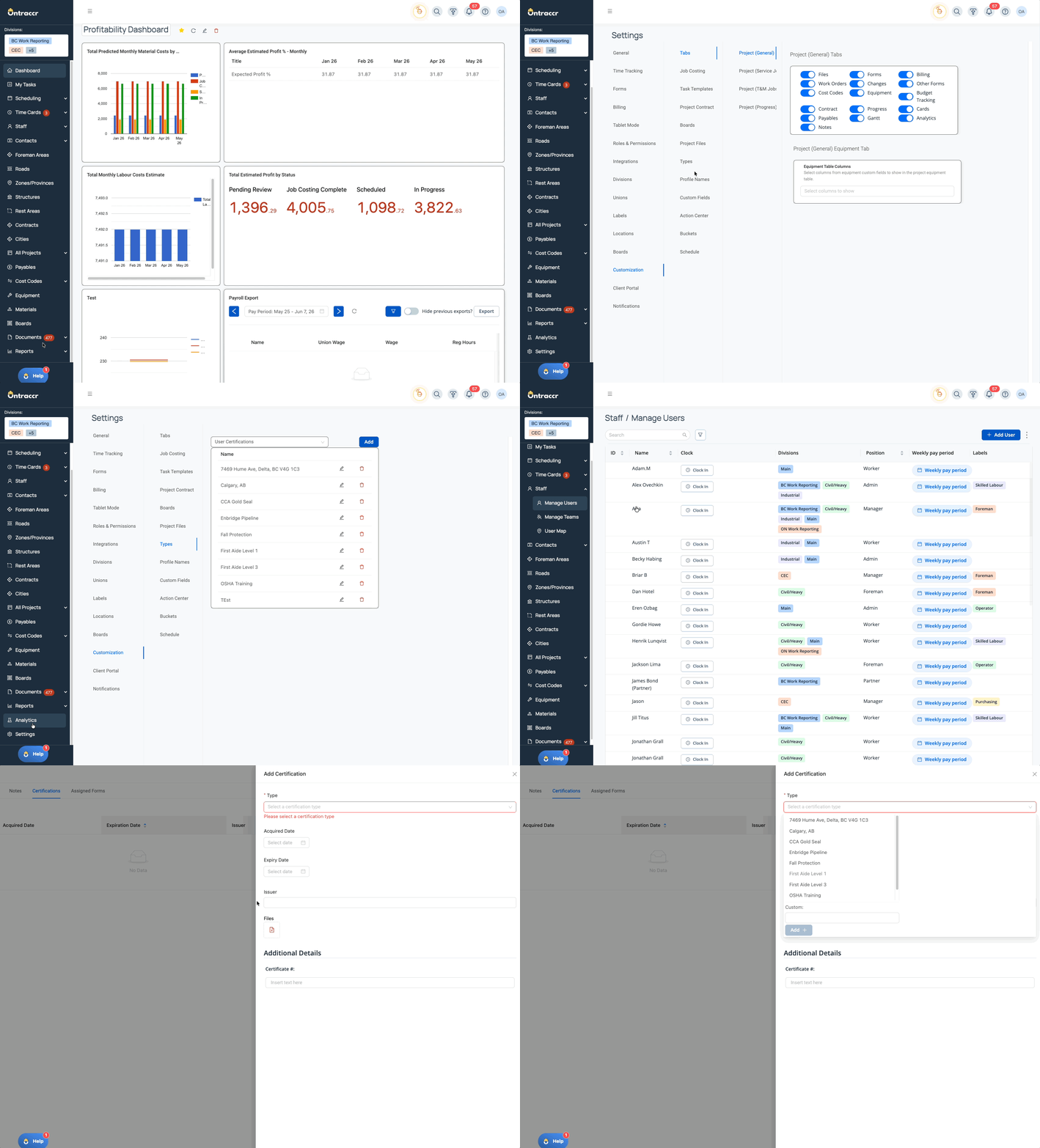
Admins can now manage certification types from Settings, helping companies standardize certification data across users and vendors.
Previously, certification types were entered manually as free text. With this update, certification types can now be managed from a centralized settings area and selected when creating or editing certifications.
This helps teams keep certification records cleaner, more consistent, and easier to report on across Ontraccr.
What’s New
- New certification type management area available in Settings > Customization > Types
- Certification types can be managed for:
- User Certifications
- Vendor Certifications
- Admins can add new certification types
- Admins can edit existing certification types
- Certification types can be deleted or archived based on whether they are already in use
- Users can select from configured certification types when adding or editing user and vendor certifications
- New certification types can be created while adding or editing a certification, where supported
- Existing certification type values are preserved and migrated into the new type structure
- Updating a certification type updates the certifications using that type
Here’s a look at how Certification Type Management helps standardize certification tracking:
⚙️ Web App Improvements & Fixes
- Performance Enhancements: Several behind-the-scenes performance improvements have been made to help improve responsiveness and reliability across the web app. These optimizations are designed to support a smoother user experience without changing existing workflows.
- Time Tracking – Redistribute Hours Across Time Types: Users can now redistribute hours between time types while keeping the same job, cost code, notes, and custom data where applicable. This supports workflows where hours need to remain on the same job or cost code but be changed from regular work to overtime, break, or other supported time types. When time types are enabled, redistribution can also include double time. The system validates that redistributed totals match the original hours and displays a breakdown of the original hours by type.
- Equipment Workflows – Check Equipment In or Out from Forms: The Update Equipment workflow step now supports equipment check-in and check-out behavior directly from form submissions. This allows users to check equipment into a location, check it out, or update its location from an equipment table without needing to enter hours solely to trigger the check-in or check-out action. Workflow settings now let teams control whether the step updates equipment check-in/check-out status, usage, and thresholds based on the available equipment table columns.
- Equipment Rates – Weekly and Monthly Cost & Billing Support: Equipment now supports weekly and monthly cost rates and billing rates, in addition to existing hourly and daily rates. Equipment table fields can include weekly and monthly quantity and rate columns, along with calculated totals for hourly, daily, weekly, monthly, total cost, and total billing values.
- Forms – Improved Project Association Handling When Editing Submitted Forms: Forms now handle project associations more accurately when submitted forms are edited. When a form uses a project dropdown or mapped project value, editing the form can update the related project association to reflect the newly selected project. Inherited project associations from project forms or triggered forms are preserved where appropriate, helping maintain the correct relationship between forms, parent records, and selected projects.
- Mass Import Tool – Expanded Profile Import Support: The Mass Import tool now supports additional profile import options. Users can import supported custom field values for applicable profile types, including text fields and choose-one-or-more fields. Bucket profile imports are also now supported, with support for core bucket details and applicable template fields. Project and Equipment imports now support labels, with new labels created during import when needed. Equipment and Material imports also support vendor values, allowing vendors to be linked or created during import.
- Equipment Workflows – Update Equipment from Time Entry Table Custom Fields: Update Equipment workflow steps can now use equipment tables stored inside Time Entry Table custom fields. This helps teams avoid entering the same equipment in multiple places when a time entry table already captures the required equipment information. When mapped, equipment listed inside those nested equipment tables can update equipment usage, thresholds, and check-in/check-out status the same way standard equipment table mappings do.
- Certification Workflows – Static Text Field Support: The Create Certification workflow step now supports using a static text field as the certification Type. This gives workflow designers more flexibility when creating certifications from forms
⚙️ Mobile App Improvements & Fixes
- Mobile Performance Enhancements: The mobile app has been optimized to improve overall performance. Data is now loaded more efficiently as users access the areas they need, helping create a faster and smoother mobile experience.
- Time Tracking – Redistribute Hours Across Time Types: Mobile users can now redistribute hours between time types while keeping the same job, cost code, notes, and custom data where applicable. This helps streamline workflows where regular work hours need to be converted to overtime or another supported time type without requiring extra manual steps. Mobile also validates that redistributed totals match the original hours and displays the original breakdown by type.
- Equipment Workflows – Check Equipment In or Out from Forms: Mobile form submissions can now trigger equipment check-in and check-out behavior through the Update Equipment workflow step. When configured, submitted equipment table data can check equipment into a location, check it out, or update its project/location based on the submitted values. Mobile also respects workflow settings for equipment usage and threshold updates.
- Equipment Rates – Weekly and Monthly Cost & Billing Support: Mobile now supports weekly and monthly equipment cost and billing rates in equipment profiles and equipment table fields. Users can enter weekly and monthly values in supported equipment tables, and calculated totals are reflected using the matching rate type, including hourly, daily, weekly, monthly, total cost, and total billing values.
- Forms – Improved Project Association Handling When Editing Submitted Forms: Mobile forms now support improved project association handling when submitted forms are edited. If a form’s project dropdown or mapped project value is changed during editing, the related project association can update to reflect the new selection while preserving inherited project relationships where appropriate.
- Equipment Workflows – Update Equipment from Time Entry Table Custom Fields: Mobile workflows now support updating equipment from equipment tables contained inside Time Entry Table custom fields. This allows equipment captured within a time entry workflow to update equipment usage, thresholds, and check-in/check-out status without requiring users to enter the same equipment again in a separate equipment table.
✅ Update 4.0.10 Summary
Update 4.0.10 delivers major improvements to overtime configuration, certification management, PDF design, equipment tracking, time tracking, project association handling, data imports, and overall app performance.
Custom Overtime Profiles give companies more flexibility when applying overtime rules across users, divisions, and company-wide settings, while Certification Type Management helps standardize user and vendor certification records across Ontraccr. The new PDF Designer font controls make it easier to create polished and professional form PDFs, and equipment workflows are now more powerful with support for form-driven check-in/check-out actions, nested equipment tables inside Time Entry Tables, and weekly or monthly equipment cost and billing rates.
This release also expands the Mass Import tool, improves how edited forms manage project associations, supports static certification type mapping in certification workflows, and introduces performance enhancements across both web and mobile. Together, these updates help teams manage time, certifications, equipment, forms, and operational data more accurately and efficiently across Ontraccr.