
Update 4.0.9
🚀 Update 4.0.9 – Release Notes
To ensure optimal performance and reliability, Ontraccr recommends using the latest version of Android or iOS on all mobile devices. Our applications are tested against the most recent operating system versions, and support for older versions is not guaranteed. Devices unable to run current OS versions may experience degraded performance or functionality.
We’re excited to announce Update 4.0.9 of the Ontraccr web and mobile apps!
This release introduces a redesigned table experience across web and mobile, a new project export tool with optional equipment details, expanded time tracking controls for night shift premiums and zero-hour entries, and several workflow, Advanced Search, equipment, and mobile visibility enhancements.
Together, these updates improve reporting flexibility, strengthen project and equipment visibility, provide more control over time tracking rules, and make field-to-office workflows easier to manage across Ontraccr.
Below is the complete list of enhancements, improvements, and fixes.
🧭 New Features & Enhancements — Web App
Redesigned Form Tables
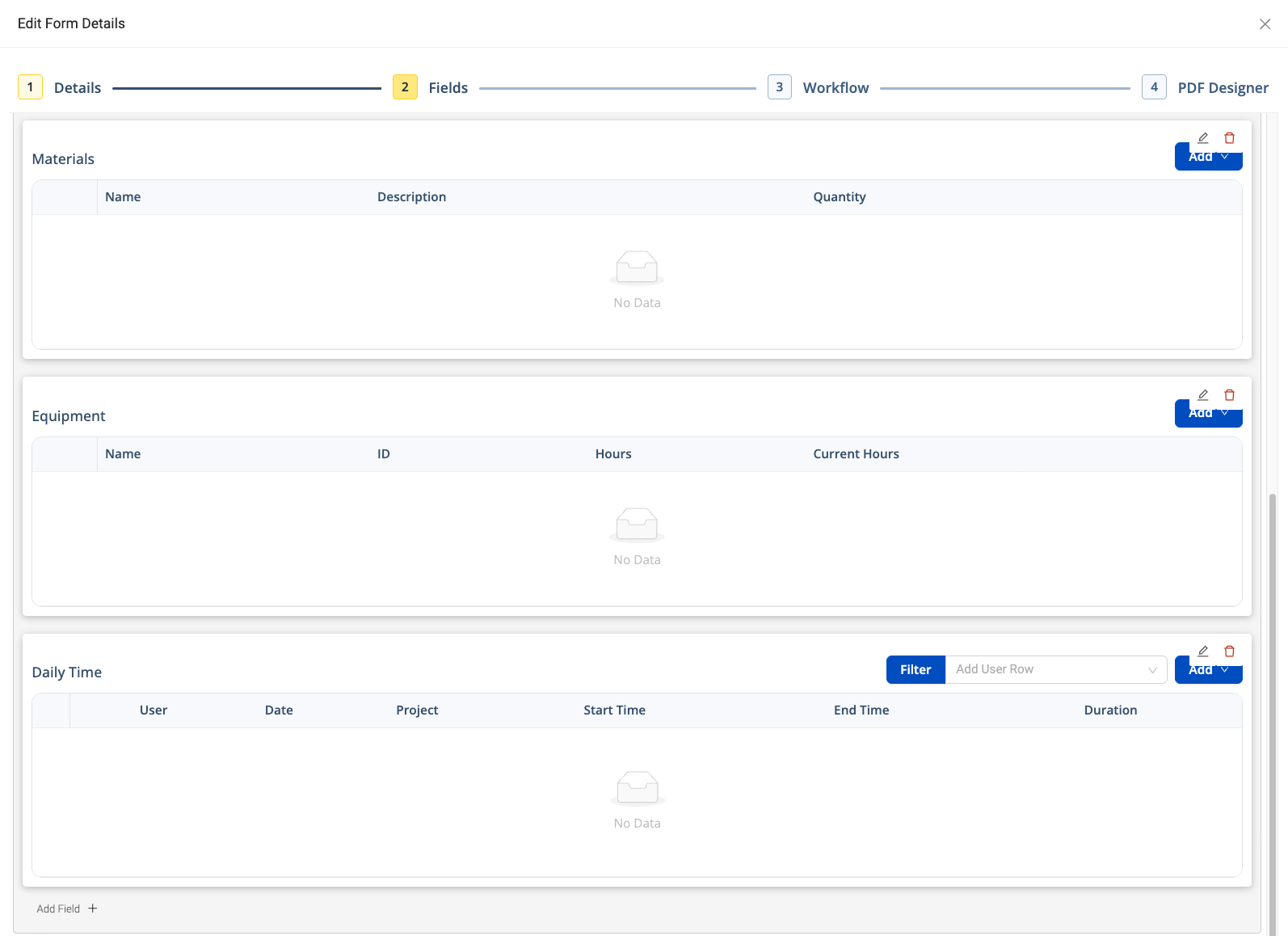
Forms now include a redesigned table experience across Ontraccr, making table-based data easier to read, enter, review, and manage.
The updated design applies both while users are filling out forms and after forms have been submitted, helping create a cleaner and more consistent experience across table-heavy workflows such as materials, labour, time entries, equipment, cost codes, and custom tables.
What’s New
- Updated visual design for form tables while completing a form
- Updated visual design for submitted form tables
- Consistent table styling across supported table types, including:
- Material
- Labour
- Change Order
- Shift
- Time Entry
- Custom Saved Form
- Custom
- Equipment
- Cost Code
- Attribute
- Bucket
- Tables with multiple Add actions now organize those actions into a clickable dropdown menu, reducing clutter and improving usability
Here’s a look at the refreshed table experience, designed to make form data cleaner, clearer, and easier to work with:
Project List Export with Equipment Details
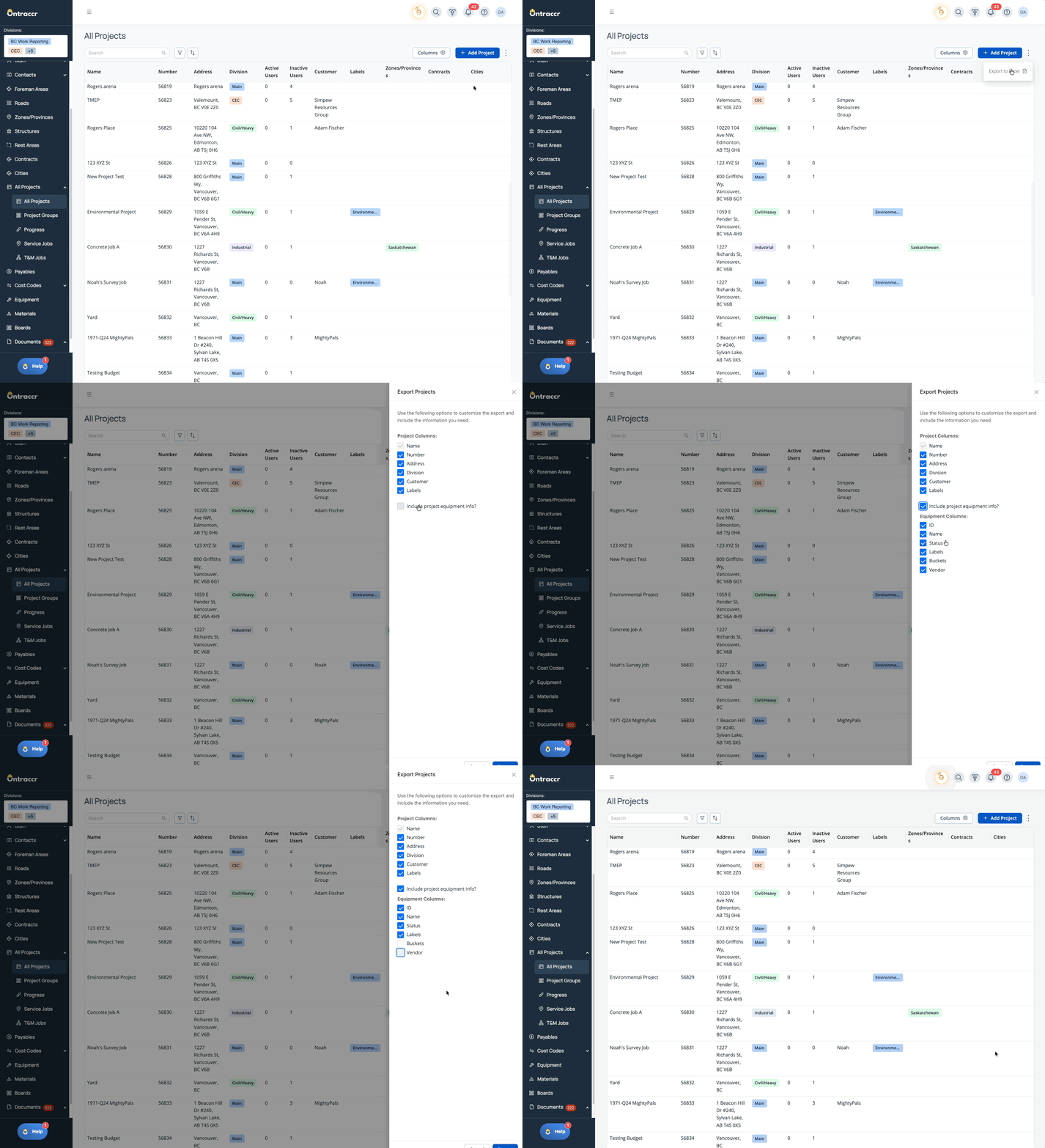
Project reporting is now more flexible with the new Project List Export, allowing users to export project lists directly from the Projects page and optionally include equipment details tied to each project.
This gives contract administrators, project managers, and coordinators a more efficient way to report on projects, project details, and jobsite equipment in a single Excel export.
What’s New
- New export option available from project type pages
- Users can choose additional project columns, including:
- Project Number
- Project Address
- Division
- Customer
- Labels
- Optional setting to include equipment information in the export
- Exports are generated as Excel files and support large project lists
Watch how easily you can export project lists with optional equipment details:
⚙️ Web App Improvements & Fixes
- Time Tracking – Night Shift Premiums: Companies can now configure a Night Shift Premium in Time Tracking settings for teams that pay employees a premium for night shift work. Admins can enable a company-wide night shift setting and configure either a premium multiplier or a fixed dollar adjustment. Once enabled, users can mark eligible manual time entries and Time Entry Table rows as night shift work. Night shift premiums are reflected in relevant pay and cost calculations, including timecards, payroll, exports, reports, Time Entry Tables, and project cost tracking. Timecards and eligible shifts also display a moon icon to help identify night shift entries.
- Time Tracking – Configurable Zero-Hour Time Entries: Admins can now control whether users are allowed to submit zero-hour time entries using a new company-level setting in Time Tracking clock settings. When enabled, users can submit manual time cards and Time Entry Tables with zero-duration entries. When disabled, users must enter at least one non-zero duration value before submitting a time card or form containing a Time Entry Table, helping teams enforce payroll, reporting, and compliance requirements.
- Payables Invoices – Cost Code Category Distribution: Payable invoice distribution now supports category-level selection when assigning invoice amounts to cost codes. For cost codes with a single category, the category is shown and locked automatically. For cost codes with multiple enabled categories, users can select the appropriate category and distribute invoice amounts across multiple categories under the same cost code. Actual Spend values are updated at the correct category level, helping improve cost tracking accuracy across project budgets and progress reporting.
- Board Workflows – Project File Template Selection: Board workflows that create projects can now include a Project File Template during project creation. When configuring a workflow with Create Project enabled, users can select a searchable and clearable file template filtered by the board’s division. When the workflow creates the project, the selected template’s folder structure is automatically applied, reducing the need to manually configure project folders after creation.
- Equipment Filters – Assigned Projects and Last Project: Equipment filtering now includes two distinct project-based filters: Assigned Projects and Last Project. Assigned Projects filters by projects directly assigned to the equipment, while Last Project filters by the project where the equipment is or was last checked in or out. These filters respect customized project naming and provide more precise equipment search results.
- Board Workflows – Update Existing Material Rows Only: The Update Board Card workflow step now supports updating existing material rows only when mapping material tables. This helps teams update material quantities from field-submitted forms without unintentionally adding new material rows back to the board card. The workflow continues to respect existing override and append behavior, allowing quantities to be replaced or incremented based on the workflow configuration.
- Board Form Mappings – Exclude Fully Allocated Materials: Board form mappings for material tables now include an option to exclude fully allocated materials. When enabled, materials where Quantity is greater than or equal to Quantity Allocated are not preloaded into the generated form. This helps field users focus only on materials that still need to be used or accounted for.
- Projects – Custom Equipment Tab Columns: Project Equipment tabs can now display additional custom field columns from Equipment profiles. These columns can be configured in Settings → Customization → Tabs and customized per project type, allowing different project types to show the equipment details most relevant to their workflows. Supported fields include basic custom field types such as text, dropdown, calculation, attribute, and static text fields.
- Advanced Search – Most Recent Day Worked in Time Entry Tables: Advanced Search now supports searching by the most recent day worked in a Time Entry Table. This allows users to find forms or board cards based on the latest date recorded in a Time Entry Table, using standard date-based operators such as before, after, and within. This applies to both form and board Advanced Search.
- Advanced Search Exports – Most Recent Day Worked Column: When users export Advanced Search results that use the Most Recent Day Worked search parameter, the export now includes a Most Recent Day Worked column. If the search query does not use that parameter, the column is not added to the export. This helps exported results stay aligned with the search criteria being used.
- Multi-Signature Field Usability Improvements: The Multi-Signature field has been updated with a cleaner design and no longer requires a linked User dropdown. When the field is linked to a User dropdown, selected users are displayed without a signature image until a signature is added, with a clear Add Signature action available.
- Drawer Layout Improvements: Improved drawer layouts across several areas of the web app to ensure footer actions remain properly positioned and content remains easier to view and interact with. This includes drawer experiences for filters, project cards, schedule of values, time tracking entries, and board cards.
⚙️ Mobile App Improvements & Fixes
- Redesigned Form Tables: The redesigned table experience is also available on mobile, giving field users a cleaner and more consistent way to interact with table-based form data. Tables now use the updated design while filling out forms and after forms are submitted, with Add actions organized into clickable dropdown menus where applicable.
- Time Tracking – Night Shift Premiums: Mobile users can now mark manual time entries and Time Entry Table rows as night shift eligible when the company-wide Night Shift Premium setting is enabled. Night shift values persist through submitted forms, preloaded entries, summary views, edits, and create time workflow steps. Mobile timecards also display a moon icon when a day includes night shift work.
- Time Tracking – Configurable Zero-Hour Time Entries: Mobile time entry workflows now respect the company-level zero-hour time entry setting. When zero-hour entries are allowed, users can submit eligible zero-duration entries. When disabled, users must enter at least one non-zero duration value before submitting time cards or forms containing Time Entry Tables.
- Board Cards – Pending Table Data on Mobile: Mobile users can now view pending table updates on board cards before the related form has been approved. Pending entries appear for mapped Material, Equipment, Time Entry, and Custom tables when a submitted form is awaiting approval and includes an Update Board Card workflow step. Pending values remain separate from approved data and do not affect calculations or analytics.
- Advanced Search – Most Recent Day Worked in Time Entry Tables: Mobile Advanced Search now supports searching forms and board cards by the most recent day worked in a Time Entry Table. Users can filter by the latest date recorded in the table using date-based operators such as before, after, and within.
- Multi-Signature Field Usability Improvements: The updated Multi-Signature field design is also available on mobile. When linked to a User dropdown, selected users appear without a signature image until a signature is added, with an Add Signature action available.
✅ Update 4.0.9 Summary
Update 4.0.9 delivers major improvements to project reporting, form table usability, time tracking controls, Advanced Search, equipment visibility, and field-to-office workflow accuracy.
The new Project List Export gives teams more flexible project and equipment reporting, while redesigned tables improve the experience of entering and reviewing structured form data across web and mobile. New Night Shift Premium and zero-hour time entry settings give companies more control over payroll-related time tracking rules, and new Advanced Search capabilities make it easier to find and export records based on the most recent day worked.
Additional improvements to project file templates, material mappings, equipment filters, pending mobile board card data, custom equipment columns, and drawer layouts help teams manage operational data more accurately and efficiently across Ontraccr.