
Update 4.0.7
🚀 Update 4.0.7 – Release Notes
We’re excited to announce Update 4.0.7 of the Ontraccr web and mobile apps!
This release introduces several workflow and usability improvements across Analytics, Time Tracking, Boards, Custom Exports, Cost Code Budgeting, and reporting workflows, along with performance enhancements for large dataset exports.
Below is the complete list of enhancements and improvements.
🧭 New Features & Enhancements — Web App
Centralized Data Import Tool
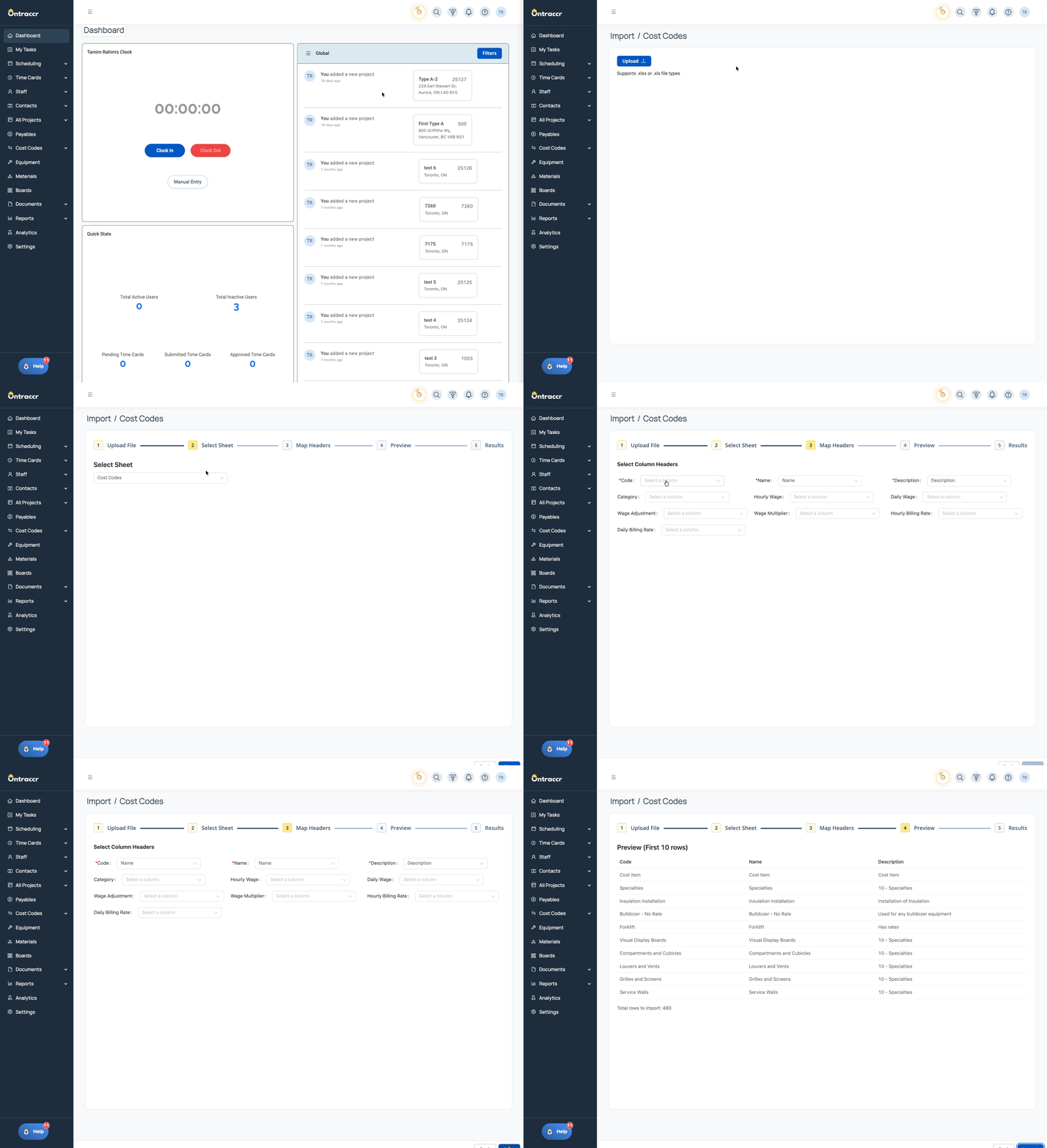
Onboarding and system setup are now faster and more self-service with the new Centralized Data Import Tool. Administrators and onboarding teams can now import key profile data directly into Ontraccr without relying on the engineering team, significantly reducing onboarding time and improving implementation efficiency.
The new import tool provides a single interface for uploading and mapping structured data, allowing organizations to quickly migrate their existing records into the platform.
What’s New
- A new centralized import tool accessible from the header for users with the appropriate permissions
- Role-based Data Import permissions to control who can perform imports
- Support for importing multiple profile types, including:
- Projects
- Customers
- Vendors
- Equipment
- Materials
- Cost Codes
- Users
- Import data using spreadsheets, with the ability to:
- Select the worksheet to import
- Map spreadsheet columns to Ontraccr fields
- Automatically pre-fill mappings when headers match
- Preview imported rows before submission to confirm mappings and data accuracy
- A detailed import results screen showing:
- Successfully imported records
- Failed records with clear error messages
- Drill-down details to identify problematic rows
- Rollback functionality allowing users to undo an import while preserving records that existed prior to the import
- Support for linking related profile types during import, such as automatically linking Projects to Customers
- Automatic project location pinning by calculating latitude and longitude from imported addresses
- Optional setting when importing users to send or suppress automatic welcome emails
Watch how quickly you can migrate your existing data into Ontraccr using the new Centralized Data Import Tool!
⚙️ Web App Improvements & Fixes
- Cost Code Tables – Hours Column for Budget Updates: Cost Code tables in forms now support an Hours column, allowing submitted values to update the estimated hours for the corresponding cost code in a project’s Budget Tracking tab when used with the Update Budget workflow step. Submitted values are added to the existing estimated hours rather than replacing them.
- Analytics – Alphabetical Sorting for List Reports: List-style analytics reports now support sorting by Title and Value, allowing users to organize results alphabetically (A–Z or Z–A) for easier navigation and faster record lookup.
- Equipment Data Preloading from Time Tracking Grids: Equipment entries captured in Time Tracking Grid fields can now preload into Equipment Tables in other forms, enabling workflows such as Daily LEM reports to automatically pull equipment hours recorded in timesheets.
- Custom Exports – Improved Handling of Custom Fields in Summary Modes: Custom exports now properly handle custom text fields when using summarization options such as Summarize by Employee, Summarize Days, and Summarize by Project.
- Advanced Search – Larger Board Export Limits: Board Advanced Search exports now support up to 10,000 results, increased from the previous 1,000 result limit. Large exports are processed using batching in groups of 1,000 records, improving system performance while allowing significantly larger reporting exports.
- Time Entry Slider – Alphanumerical Project Sorting: The Project dropdown in the Time Entry slider now sorts projects alphanumerically, supporting all project label formats including Name, Number, and Number + Name. Search results within the dropdown are also returned in proper alphanumerical order.
- Board Card Linking – Searchable & Sorted Dropdowns: Dropdowns used when linking records to a Board Card now support search functionality and alphanumerical sorting across all link types, including Users, Projects, Customers, Equipment, and Materials.
- Project Buckets – Searchable & Sorted Dropdown: The Bucket dropdown in Project Profiles now includes search functionality and alphanumerical sorting, making it easier to locate and assign buckets when working with large lists.
- Granular Permissions for Viewing Form Logs: Form log permissions can now be configured at the form type level, allowing administrators to control exactly which types of forms a user role can view in the Form Log. Previously, the View Form Log permission granted access to all form submissions or none at all. With this update, admins can selectively enable or disable visibility for individual standard and custom form types, ensuring sensitive submissions—such as HR forms—are only visible to the appropriate teams. Newly created custom form types are automatically added to the permissions list with visibility enabled by default.
⚙️ Mobile App Improvements & Fixes
- Time Entry Slider – Alphanumerical Project Sorting: The Project dropdown when creating time entries on mobile now sorts projects alphanumerically and ensures search results are also returned in the correct order, matching the behavior introduced on the web app.
✅ Update 4.0.7 Summary
Update 4.0.7 delivers several usability and reporting improvements across Analytics, Boards, Time Tracking, and Custom Exports, including larger Advanced Search export limits, improved dropdown navigation with consistent alphanumerical sorting and search, enhanced equipment data preloading between forms, and new capabilities for updating project cost code hours directly from form submissions.
These updates help streamline reporting workflows, improve navigation across large datasets, and strengthen integrations between time tracking, budgeting, and project reporting tools across both web and mobile.