
Update 4.0.11
🚀 Update 4.0.11 – Release Notes
To ensure optimal performance and reliability, Ontraccr recommends using the latest version of Android or iOS on all mobile devices. Our applications are tested against the most recent operating system versions, and support for older versions is not guaranteed. Devices unable to run current OS versions may experience degraded performance or functionality.
We’re excited to announce Update 4.0.11 of the Ontraccr web and mobile apps!
This release introduces new Project Billing Rates for managing project-specific labour and equipment billing rates, configurable Board Card Colour Legends, automatic clock-out controls for long-running time entries, expanded SOV and contract billing functionality, stronger task and certification permissions, enhanced workflow automation, and several reporting, integration, and performance improvements.
Together, these updates give teams more control over billing rates, contract progress, task visibility, certification access, workflow automation, reporting performance, and field-to-office data accuracy across Ontraccr.
Below is the complete list of enhancements, improvements, and fixes.
🧭 New Features & Enhancements — Web App
Project Billing Rates
Project billing is now more flexible with new support for project-specific labour and equipment billing rates.
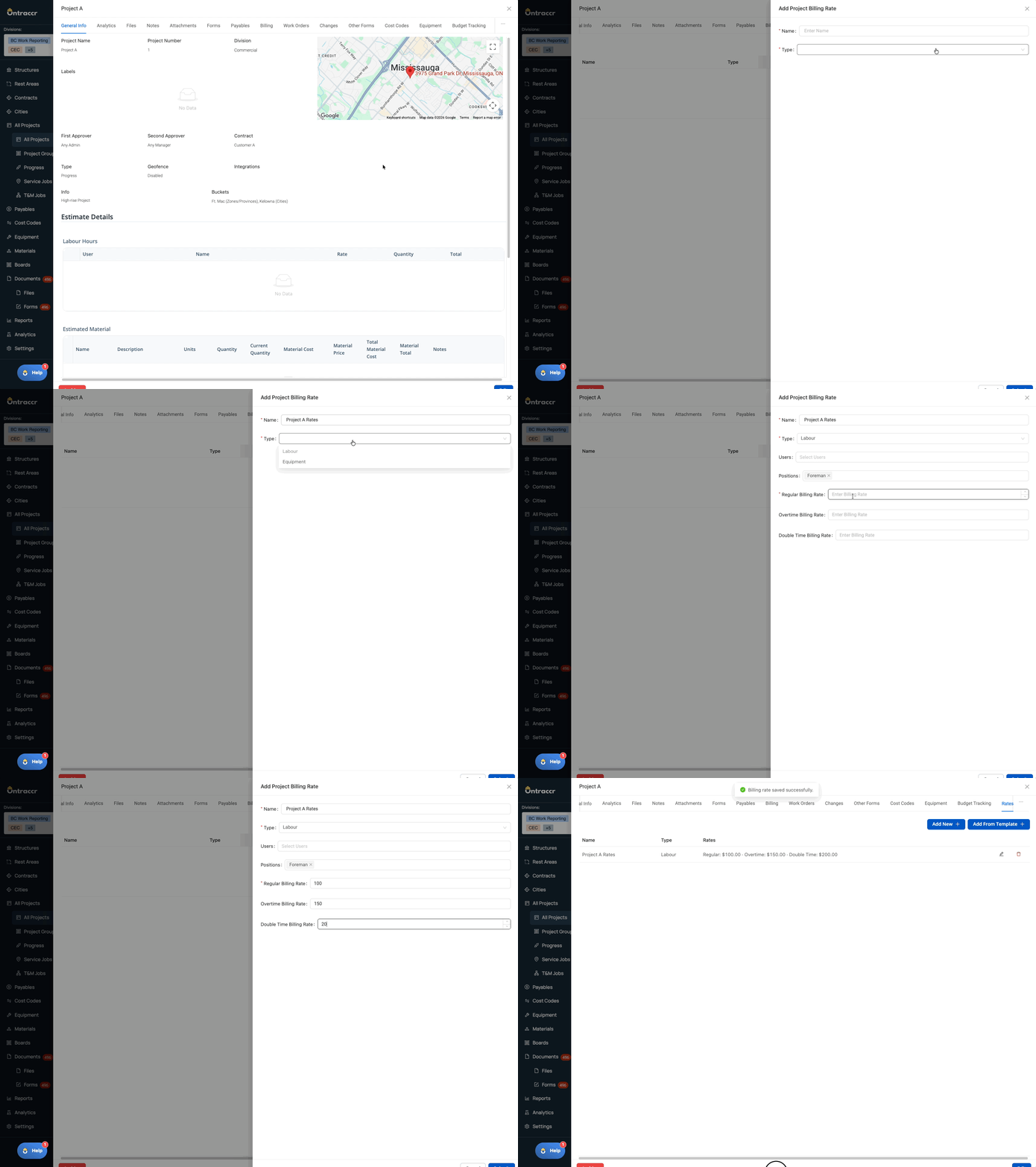
Admins can now create global project rate templates and apply them to individual projects, giving teams a faster way to configure billing rates while still allowing each project to have its own localized rate setup. This helps companies manage project-specific labour and equipment billing without relying only on general labour or equipment rate settings.
As part of this update, the existing Settings → Time Tracking → Rates page has been renamed to Labour Rates for clarity.
What’s New
Project Billing Rates gives teams a centralized way to manage labour and equipment billing rates at the project level, making it easier to apply the right rates to the right people, roles, equipment, and project work.
Instead of manually adjusting billing details across forms or relying only on general rate settings, teams can now configure reusable global rate templates and apply project-specific rates directly from the project profile.
Key highlights include:
- Global project rate templates for labour and equipment
- A new Rates tab on project profiles for managing project-specific billing rates
- Support for role-based and user-specific labour billing rates
- Support for equipment type and equipment-specific billing rates
- Regular, overtime, and double time billing rates for labour
- Hourly billing rates for equipment
- Ability to import global rate templates into a project and customize them for that project
- Project-level validation to help prevent conflicting rate assignments
This gives project teams a cleaner, more scalable way to manage billing rates across different jobs, crews, equipment, and billing scenarios.
Here’s a look at how you can setup Project Billing Rates to help your team(s) configure project-specific labour and equipment billing:
Configurable Board Card Colour Legends
Boards now support configurable colour legends for board cards, giving teams a more consistent way to organize, label, and interpret card colours across their workflows.
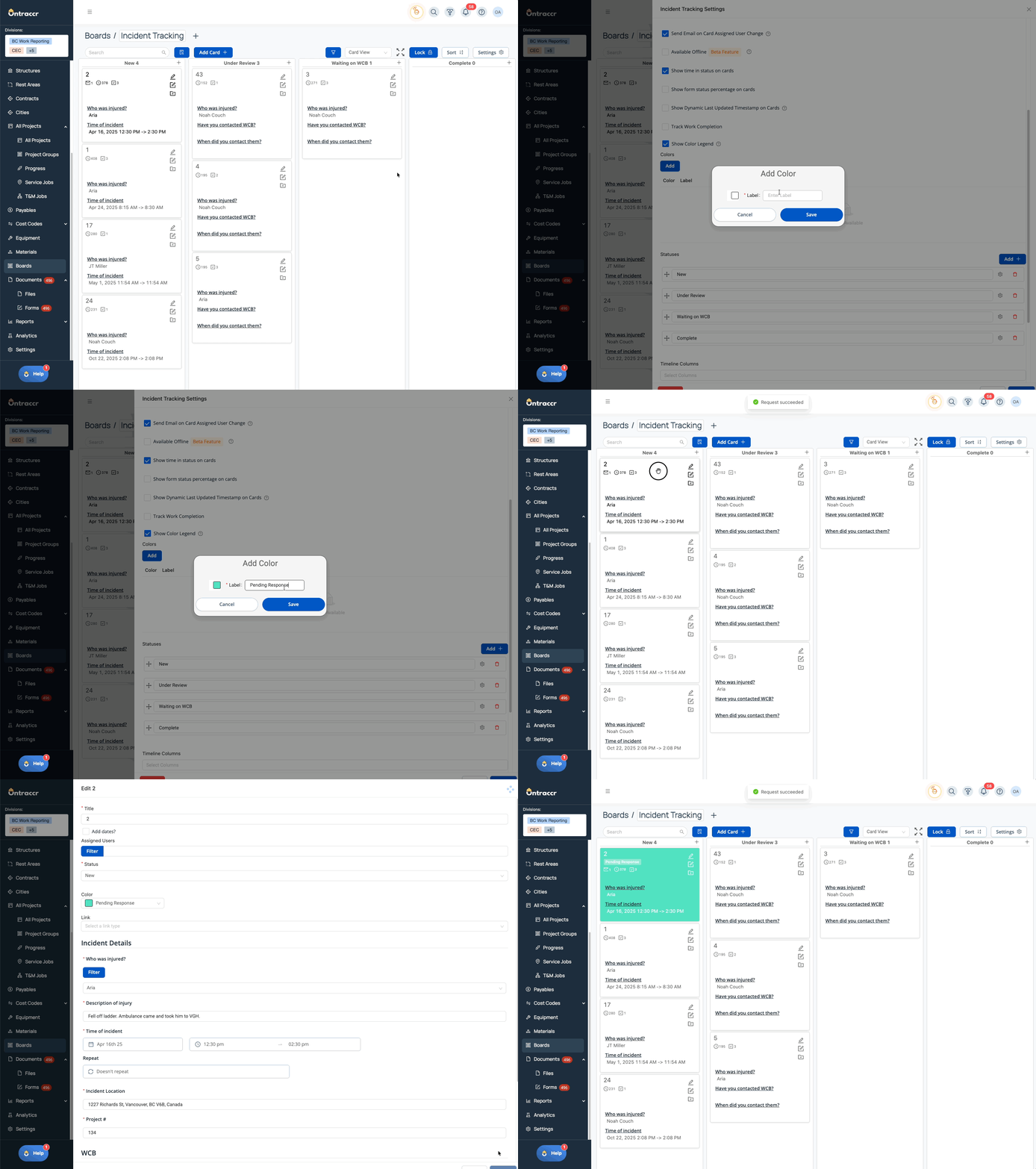
Instead of using colours without a defined meaning, admins can now configure preset colours and labels for a board. Once configured, users can select from the board’s approved colour list when creating, editing, uploading, or updating cards through supported workflows.
This helps teams standardize visual board processes such as priority, status, department, work type, risk level, or any other colour-based categorization used in their operations.
What’s New
Configurable Board Card Colour Legends make board colours more meaningful, consistent, and easier to manage across Ontraccr.
Teams can now define approved colour options for each board, giving every card colour a clear label and purpose. This helps users quickly understand what a card colour represents, whether it’s priority, work type, risk level, department, status, or another workflow-specific category.
Key highlights include:
- Board-level colour presets with custom labels
- Controlled colour selection when creating, editing, uploading, or updating cards
- Colour legend support in board templates
- Workflow support for card colour selection where applicable
- Colour labels displayed on cards when a colour matches a configured preset
- Mobile support for viewing and using configured board colour legends
Boards without configured colour presets can still use any colour, while boards with presets can standardize colours across the team.
Here’s a look at how you can configure colour legends to make board card colours easier to standardize and understand:
⚙️ Web App Improvements & Fixes
- Time Tracking – Automatic Clock-Out for Long-Running Time Entries: Admins can now enable automatic clock-out for long-running time entries. The setting is duration-based and supports values from 1 to 24 hours. When a user remains clocked in beyond the configured threshold, Ontraccr automatically clocks them out, flags the affected time card, adds the event to the time card timeline, and notifies the employee. Automatically clocked-out entries are also shown in the violation column/list view and include labels or indicators on the affected entries. This feature works with rounding policies, task type rounding, auto breaks, offline clocking, and clock-out reminders, while skipping clock-out behaviours such as facial capture, GPS capture, auto submit, and overtime eligibility threshold warnings. Users can still clock in again after being automatically clocked out.
- Forms and Board Cards – Automatic Attribute Population from Linked Dropdown Selections: Forms, board cards, and triggered records now automatically populate linked attribute and dynamic attribute fields when a mapped “choose one or more” field is used during creation. This applies to workflows such as creating board cards from forms, triggering forms from completed forms, individual field triggers, attribute tables, and supported custom workflow-created forms. When the source and destination objects share the same mapped linked field, related attribute and dynamic attribute fields now populate immediately without requiring users to manually edit and save the created record.
- Form Workflows – Scheduled and Repeating Email Reminders: The Form Email workflow step now supports scheduled and repeating emails. Workflow builders can enable scheduling, choose when emails start sending, configure repeat settings, set a stop date, and optionally stop scheduled emails when the workflow is complete. Scheduled emails can be sent to configured recipients and always include the current state of the form. A new Don’t send form PDF option allows teams to send the email without attaching the form PDF. Form timelines are updated when scheduled reminders are created, sent, or cancelled, and scheduled reminders can be cancelled from the form timeline.
- Time Entry Tables – Separate Regular, Overtime, and Double Time Hour Columns: Time Entry Tables now support separate Regular Hours, OT Hours, and Double OT Hours columns when the time entry types feature flag is enabled. These columns provide an alternative to combining time types into a single duration-style column. The new hour columns are inline editable for hour-based entries, convert decimal inputs into hours/minutes format, update the Add Time Entry drawer, support workflow-created time entries, and work with preloading, column renaming, Hide from PDF, workflow field mappings, Form Trigger mappings, auto breaks, and hour warning thresholds.
- Time Entry and Equipment Tables – Project-Based Billing Rate Columns: Time Entry Tables now support new Regular Billing Rate, OT Billing Rate, and DT Billing Rate columns. The existing Hourly Billing Rate column has also been renamed to Cost Code Hourly Billing Rate for clarity. Equipment Tables now respect configured project equipment billing rates when available, allowing project-specific equipment rates to override native equipment rates or cost code billing overrides for that project. Billing rate values can be pulled from the associated project on the form or card and used in custom calculation columns and supported custom calculation fields.
- Board Workflows – Static Text Field Mapping for Board Card Titles: The Create Board Card workflow step now supports mapping Static Text fields into board card titles. This allows workflow builders to create correctly named board cards using predefined form content instead of requiring user-entered text.
- Board Workflows – Static Text Mapping to Custom Dropdown Fields: The Create Board Card workflow step now supports mapping Static Text fields into custom choose-one-or-more fields on board cards. Static Text values are matched to existing dropdown options by exact name.
- Analytics – Custom Dropdown Breakdowns for Time Card Hours Reports: Time Cards – Hours Worked analytics reports can now be broken down by supported single-selection custom dropdown fields from time cards. Only single-selection choose-one-or-more fields appear as breakdown options. Reports using these breakdowns can be saved, loaded, filtered, and generated using the same behaviour as existing breakdown options, while protecting against disruptive behaviour if a field is later changed from single-selection to multi-selection.
- Contract PDFs – Division-Specific Logo Support: Divisions can now have their own optional logos. Admins can upload and manage a logo in division settings, and contract/SOV PDF exports use the project division’s logo when one exists. If the project’s division does not have a logo, the PDF falls back to the company logo from general account settings. The existing Load in company image toggle continues to control whether a logo appears in the PDF.
- Board Workflows – Automatically Link Created Cards Back to Parent Forms: The Create Board Card workflow step now includes an option to automatically fill a card dropdown field on the parent form with the newly created board card. This allows downstream workflow steps to reference the created card without requiring users to manually edit the parent form. The setting only appears when the form contains a card dropdown tied to the same board as the Create Board Card step, and it does not overwrite an existing selected value.
- Board Cards – Full Card Access from Linked Records: Board card hyperlinks now open the full board card view from supported linked areas, including Timecards, Project Forms List, Main Forms Log, and Equipment Forms List. Users can access board card details, the Analytics tab, the Forms tab, attached forms and checklists, and supported form actions from the linked card view. Editing, status updates, form generation, and form mapping access continue to respect board permissions, board form permissions, board lock status, board creator access, and company owner access.
- Alberta Work Reporting – Automatic Batch Export Emails: The Alberta Work Reporting module now includes settings for automatically emailing exported batch files. Admins can configure the email subject, body, and recipients from the Alberta Work Reporting settings screen. Recipients can include users, positions, and direct email addresses. When a batch file is exported, Ontraccr sends the configured email with the batch text file attached.
- Labour Tables – Position Column Support: Labour Hours Tables now support a configurable Position column. When enabled, the column displays the selected user’s assigned position and is view-only in the table. The Position column automatically populates when a user is selected or when labour rows are added from a time card.
- Contracts – Quantity-Based SOV Progress and Billing Updates: The Contract page now supports quantity-based progress and billing calculations. Estimated Qty and Billable Qty can directly impact % Complete, allowing invoice amounts to be driven by the Billable Qty value when the relevant columns are enabled. A new read-only Previously Billed Qty column shows quantity billed to date and accumulates submitted Billable Qty values. When an SOV is submitted, Billable Qty resets to 0 and the submitted quantity is added to Previously Billed Qty. % Complete is calculated using Billable Qty plus Previously Billed Qty divided by Estimated Qty.
- SOV Tables – Preload Contract Data and Update Project SOV Rows from Forms: SOV Tables can now preload existing SOV data from a project’s Contract page. Users can configure preloading from a fixed project or project dropdown, select a contract template, and link each SOV Table to a specific section such as Base Contract, Changes, Sub-Contracts, Non-holdback Items, or a custom/template SOV section. The Update Contract workflow step can now link to preload-enabled SOV Tables, allowing submitted forms to update existing preloaded rows in the project Contract tab without adding new rows or deleting existing ones. SOV Table calculations now align with Contract tab SOV behaviour, including quantity-based % Complete, Invoice Amount, Progress To Date, Previous Billings, Previously Billed Quantity, and Total Changes handling.
- Reports – Improved Performance for Large Custom Exports: Custom export tables in Reports → Exports now use virtualization to better support long result sets. Users can scroll through large custom exports, open linked items such as time cards or forms from export rows, and return to the table without the table display being disrupted.
- Alberta Work Reporting – Edit Bid Items from Work Reports: The Alberta Work Reporting module now allows users to edit the Bid Item directly from the Work Report edit screen. This helps correct cases where work was reported against the wrong bid item without requiring users to navigate back to the board card. Updates flow back to the related board card’s Reporting tab so reported quantities are removed from the old bid item and applied to the corrected bid item.
- Equipment Tables – Row-Level Project Selection for Equipment Usage: Equipment Tables can now include a row-level Project selector, allowing each equipment entry to be assigned to the correct project. This supports workflows where one form submission includes equipment usage across multiple projects. Row-level project selection can prefill from the form-level project selection, is stored against the individual Equipment Table row, is supported by the Update Equipment workflow step, and can be used by the Ontraccr → Eclipse equipment sync where configured.
- QuickBooks Online – Retry Failed Time Entry Syncs: Failed QuickBooks Online time entry sync attempts now show the relevant error state and provide a retry option for failed time entry records. The retry option is only available for failed time entry records and does not appear for successful time entries or non-time-entry records.
- Dashboard Tasks – Permission-Based Visibility Controls: A new View Others’ Tasks permission has been added to Roles & Permissions. Users without this permission can only see their own assigned tasks in the dashboard task widget. Users with the permission can see their own tasks and other users’ tasks in the dashboard task widget according to their permissions.
- Tasks – Team Task Management and Multi-User Assignment: Task management now includes stronger support for team task workflows. Users with View Others’ Tasks can access Team Tasks, while users without it only see My Tasks. A new Manage Others’ Tasks permission controls whether users can create, edit, delete, and assign tasks for other users. Users with the permission can assign tasks to multiple users in one action, creating individual tasks for each assignee. Task templates also support multiple assigned users, and imported templates respect assigned users when the user has the required permission.
- Forms – Separate Permission for Form Template Access: A new View Form Templates permission gives admins more control over who can access the Forms → Templates page. This separates general form access from form template visibility, allowing users to access permitted form areas without necessarily viewing the company’s full form template library. The permission is enabled by default for Admins and Managers and disabled by default for other roles.
- Alberta Work Reporting – Improved Performance for Large Work Reports: The Alberta Work Reporting Work Reports table now uses virtualization to improve performance with larger report tables. Work Report data loads properly and users can scroll through large report results more smoothly.
- Certifications – Granular User and Vendor Certification Management Permissions: New certification permissions give admins more control over who can manage certifications without granting broader user or vendor management access. Manage Certifications allows users to add, edit, and delete certifications on user profiles they are already allowed to view, without requiring Manage Users. Manage Vendor Certifications allows users to manage vendor certifications without requiring Manage Vendors.
- Field Schedule – Improved Shift Stacking: Field Schedule jobs and shifts now stack correctly instead of overlapping. This improves visibility for regular, all-day, and multi-day shifts across Month view, User Day, and User Week. Month view also supports proper display of additional items when a day has too many scheduled items to show at once.
⚙️ Mobile App Improvements & Fixes
- Time Tracking – Automatic Clock-Out for Long-Running Time Entries: Mobile now supports automatic clock-out for long-running time entries when the company setting is enabled. Mobile users see labels or notices when an entry has been automatically clocked out, including a Clock page notice when applicable. Offline auto clock-out behaviour is supported, and synced entries show the same auto-clocked-out treatment after the device comes back online.
- Forms and Board Cards – Automatic Attribute Population from Linked Dropdown Selections: Mobile now supports automatic population of linked attribute and dynamic attribute fields when forms, board cards, or triggered records are created from mapped choose-one-or-more fields. This helps ensure records created from mobile submissions display the expected linked attribute values without requiring a manual edit/save step.
- Board Card Colour Legends: Mobile users can view and use configured board card colour legends where supported. Boards with configured presets restrict card colour selection to those presets when creating or editing cards on mobile, while boards without presets continue to allow any colour.
- Time Entry Tables – Separate Regular, Overtime, and Double Time Hour Columns: Mobile Time Entry Tables now support Regular Hours, OT Hours, and Double OT Hours columns when the time entry types feature flag is enabled. The columns are inline editable for hour-based entries, convert decimal inputs into hours/minutes format, update the Add Time Entry drawer, and remain read-only for time-based entries. Mobile also supports workflow-created time entries, preloading, Form Trigger mappings, and auto break calculations with the new columns.
- Time Entry and Equipment Tables – Project-Based Billing Rate Columns: Mobile supports the new Time Entry Table billing rate columns for Regular Billing Rate, OT Billing Rate, and DT Billing Rate, along with the renamed Cost Code Hourly Billing Rate column. Equipment Tables on mobile also respect project-based equipment billing rates where configured, helping ensure mobile form entries use the correct project, labour, and equipment billing rate logic.
- Board Workflows – Static Text Field Mapping for Board Card Titles: Mobile form submissions can trigger Create Board Card workflow steps that use Static Text field values for board card titles.
- Labour Tables – Position Column Support: Mobile Labour Hours Tables now support the configurable Position column. When enabled, the column displays the selected user’s assigned position, populates when rows are added from time cards or when a user is selected, and remains read-only.
- SOV Tables – Preload Contract Data and Update Project SOV Rows from Forms: Mobile now supports the updated SOV Table behaviour, including preloaded SOV data, read-only SOV fields, Contract tab-aligned calculations, Invoice column handling, and Update Contract workflow behaviour for preload-enabled SOV Tables.
- Equipment Tables – Row-Level Project Selection for Equipment Usage: Mobile Equipment Tables can now capture project selection at the individual equipment row level. This supports equipment usage across multiple projects in a single form submission and helps ensure the selected row-level project is stored and used by supported downstream workflows and integrations.
✅ Update 4.0.11 Summary
Update 4.0.11 delivers major improvements to project billing, board card organization, contract and SOV workflows, time tracking, task management, permissions, reporting, integrations, and mobile field data capture.
Project Billing Rates give teams a new way to configure project-specific labour and equipment billing rates, while configurable Board Card Colour Legends help standardize card colours across board workflows. Time Tracking improvements introduce automatic clock-out controls and new Regular, OT, and Double Time table columns, while billing rate updates bring project-based labour and equipment rates into Time Entry and Equipment Tables.
This release also expands contract and SOV capabilities with quantity-based progress calculations, division-specific contract PDF logos, SOV preloading, and Update Contract workflow support. New permissions for tasks, form templates, and certifications give admins more granular access control across sensitive workflows, while workflow enhancements make it easier to create, link, title, and populate board cards automatically.
Together, these updates help teams manage billing, reporting, workflows, permissions, forms, tasks, and project data more accurately and efficiently across Ontraccr.